New-ADUser -SamAccountName hexiaomin \
-Name 何小闵 \
-UserPrincipalName hexiaomin@hxx.tt \
-DisplayName 何小闵 \
-Office 集团创意中心 \
-EmailAddress hexiaomin@hxx.tt \
-Title 信息发展创意工程师 \
-Department 信息发展中心 \
-Manager heyixuan \
-Path “OU=创意中心,OU=用户组,OU=集团,DC=hxx,DC=tt” \
-AccountPassword (convertto-securestring “hxm^-^10024” -asplaintext -force) \
-PasswordNeverExpires $true \
-Enabled $true
分类: Windows ActiveDirectory
AD 单域多站点部署流程
- 创建新的站点,
- 创建站点子网
- 定位DC,或者加入新的DC,或移动现在有DC
- 创建站点连接
- 设置桥头服务器
- 创建站点链接桥(可以作为备用链路)
- 常用 命令
- 查询 站点 dsquery site
- 查询 服务器所在的站点 dsquery server 或 get-addomaincontroller -filter * | ft Hostname,Site查询站点子网 get-adreplicationsubnet -filter * | ft name,site
- 查询 “站点链接”中的站点 get-adreplicationsitelink -filter *
- 创建站点链接 new-adreplicationSiteLink -name ‘bj-wx’ -InterSiteTransportProtocol ip -SitesIncluded bj,wx
- 设置站点链接开销和复制间隔 set-AdreplicationSiteLink ‘bj-wx’ -Cost 10 -ReplicationFrequencyInMinutes 15
- 查询站点链接桥 Get-ADReplicationSiteLinkBridge -Filter *
Windows 文件夹审计
$Path = “E:\Public”
$AuditChangesRules = New-Object System.Security.AccessControl.FileSystemAuditRule(‘Everyone’, ‘Delete,DeleteSubdirectoriesAndFiles’, ‘none’, ‘none’, ‘Success’)
$Acl = Get-Acl -Path $Path
$Acl.AddAuditRule($AuditChangesRules)
Set-Acl -Path $Path -AclObject $Acl
或者
$path 参数指定需要设置审核策略的文件或文件夹
$computer = gc env:computername
$path = "C:\New Folder"
$user = "everyone"
$path = $path.replace("\", "\\")
$SD = ([WMIClass] "Win32_SecurityDescriptor").CreateInstance()
$ace = ([WMIClass] "Win32_ace").CreateInstance()
$Trustee = ([WMIClass] "Win32_Trustee").CreateInstance()
$SID = (new-object security.principal.ntaccount $user).translate([security.principal.securityidentifier])
[byte[]] $SIDArray = ,0 * $SID.BinaryLength
$SID.GetBinaryForm($SIDArray,0)
$Trustee.Name = $user
$Trustee.SID = $SIDArray
$ace.AccessMask = [System.Security.AccessControl.FileSystemRights]"Modify"
$ace.AceFlags = "0x67"
$ace.AceType = 2
$ace.Trustee = $trustee
$SD.SACL = $ace
$SD.ControlFlags="0x10"
$wPrivilege = gwmi Win32_LogicalFileSecuritySetting -computername $computer -filter "path='$path'"
$wPrivilege.psbase.Scope.Options.EnablePrivileges = $true
$wPrivilege.setsecuritydescriptor($SD)
参考:
https://blogs.technet.microsoft.com/bulentozkir/2009/12/26/sample-powershell-code-to-enable-auditing-on-a-folder/
https://docs.microsoft.com/es-es/dotnet/api/system.security.accesscontrol.aceflags?view=netframework-4.7.2
https://docs.microsoft.com/en-us/dotnet/api/system.security.accesscontrol.acetype?view=netframework-4.7.2
https://woshub.com/tracking-files-deletion-using-audit-policy-and-mssql
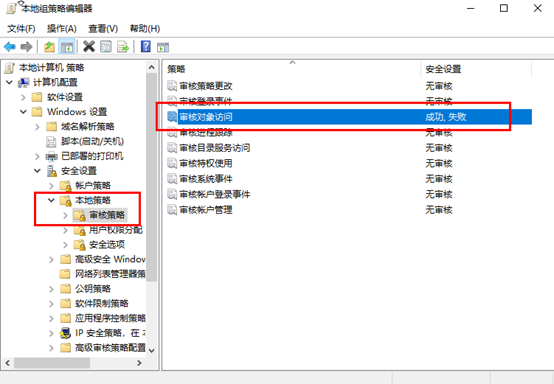
打开组策略中的文件访问审计
使用secedit 或 auditpol 命令
1. secedit
导出策略
secedit /export /cfg gp.inf /log 1.log
修改审核对象访问为成功和失败:
echo [version] > 1.inf
echo signature="$CHICAGO$" >> 1.inf
echo [Event Audit] >> 1.inf
echo AuditObjectAccess=3 >> 1.inf
secedit /configure /db 1.sdb /cfg 1.inf /log 1.log /quiet
del 1.*
gpupdate /force
Windows 审核及账户锁定
查找锁定的用户并解锁
Search-ADAccount -Locked | Select Name, LockedOut, LastLogonDate
Get-ADUser -Filter * -Properties * | where{$_.lockedout} | ft name
Get-ADUser -Filter * -Properties * | where{$_.lockedout} | Unlock-ADAccount
账户锁定的事件ID为4740
日志审核是否开启
AD服务器通过命令auditpol /get /category:*查看系统审核策略是否开启
$PDC = Get-ADDomainController -Filter * | Where-Object {$_.OperationMasterRoles -contains “PDCEmulator”}
function GetLockedDetails($events)
{
$ret = $events | Select-Object -Property @(
@{Label = ‘用户名’; Expression = {(Get-ADUser -Identity $_.Properties[2].value).Name}}
@{Label = ‘域账号’; Expression = {$_.Properties[0].Value}}
@{Label = ‘锁定源计算机’; Expression = {$_.Properties[1].Value}}
@{Label = ‘锁定时间’; Expression = {$_.TimeCreated}}
@{Label = ‘域控’; Expression = {$_.MachineName}}
@{Label = ‘事件信息’; Expression = {$_.Message -split “`r” | Select -First 1}}
)
return $ret
}
$LockedOutEvents = Get-WinEvent -ComputerName $PDC.HostName -FilterHashtable @{LogName=’Security’; Id=4740}
$ExportPath = “$env:USERPROFILE\Desktop\$(Get-Date -Format “yyyy-MM-dd-HH-mm”)-lockedinfo.csv”
GetLockedDetails -events $LockedOutEvents | Export-Csv -Path $ExportPath -Encoding UTF8 -NoTypeInformation
导出和导入安全策略
- 导出安全策略:
- 使用
secedit.exe工具导出当前的安全配置。命令示例:secedit /export /cfg C:\security-policy.inf。 - 执行命令后,安全策略将被导出到指定的
.inf文件中。
- 使用
- 导入安全策略:
- 使用相同的
secedit.exe工具将之前导出的安全策略导入到另一个Windows系统。命令示例:secedit /configure /db secedit.sdb /cfg C:\security-policy.inf /overwrite
- 使用相同的
查看域默认密码策略
Get-ADDefaultDomainPasswordPolicy
参考链接:
https://4sysops.com/archives/find-the-source-of-account-lockouts-in-ad
Powershell 计划任务
一般创建基本任务执行
在”程序和脚本”中键入如下
Powershell -f “文件路径\a.ps1” -脚本参数
如下截图
