ceph osd dump
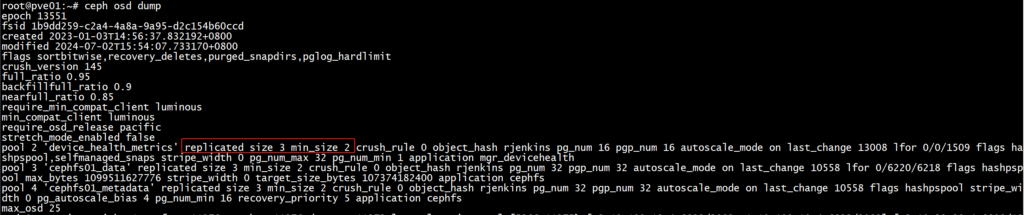
ceph osd dump | grep ‘replicated size’
ceph osd dump
ceph osd dump | grep ‘replicated size’
| 1 | PoolPGCount=(TargetPGsPerOSD ∗ OSDNumber ∗ DataPercent) / PoolReplicateSize |
参数
| 参数名称 | 参数释义 | 备注 |
|---|---|---|
| PoolPGCount | 该pool的PG数量 | |
| TargetPGsPerOSD | 每个OSD的PG数量 | 该值根据如下规则来进行设置: 1. 如果未来集群的OSD数量基本不再增长,Target PGs per OSD =100 2. 如果未来集群的OSD数量可能增长到目前规模的2倍以内,Target PGs per OSD =200 3. 如果未来集群的OSD数量增长规模大于当前2倍且小于3倍,Target PGs per OSD =300 |
| OSDNumber | OSD数目 | 默认是所有的OSD, 具体看OSD所属的rule 一般会通过CRUSH rules划分SSD和SATA两个ruleset,此时单独填写pool所在的对应rule的OSD数量 |
| DataPercent | 该pool占用所在OSD集群容量百分比 | 需要预估 |
| PoolReplicateSize | 该pool的副本数 | replicate size,默认是3 如果是EC pool,该值为 m+n |
1、如果上述计算结果小于 OSDNumber/PoolReplicateSize ,那就使用值 OSDNumber/PoolReplicateSize 。这是为了确保每个Pool的每个OSD至少分配一个Primary或Secondary PG来确保均匀加载/数据。
2、计算的最终结果应该是与计算结果相邻的2的幂次方。
采用2的幂次方是因为了提高CRUSH算法的效率
3、如果结果超过较小2次幂数值的25%则选择较大的2次幂作为最终结果,反之则选择较小的那个2次幂数值。
1、计算公式的目的是为了确保整个集群拥有足够多的PG从而实现数据均匀分布在各个OSD上,同时能够有效避免在Recovery 和Backfill 的时候因为PG/OSD比值过高所造成的问题。
2、如果集群中存在空pool或者其他non-active的pool,这些pool并不影响现有集群的数据分布,但是这些pool仍然会消耗集群的内存和CPU资源。
https://docs.ceph.com/en/latest/cephadm/services
nfs-ganesha daemon.rbd component and interacts with the rados and ceph-osd daemons.In a Ceph cluster, services are organized and managed at different levels:
The command syntax to start, stop, or restart cluster service is;
ceph orch <start|stop|restart> <service_name>
List Ceph SystemD services running on a specific node;
sudo systemctl list-units "*ceph*"
Thus, the command syntax is;
ceph orch daemon <start|stop|restart> SERVICE_NAME
You can get the SERVICE_NAME from the ceph orch ps command.
ceph orch daemon restart grafana.ceph-admin
Check more on;
ceph orch daemon -hceph osd down 0 && ceph osd destroy 0 --force ceph osd down 1 && ceph osd destroy 1 --force ceph osd down 2 && ceph osd destroy 2 --force
1.13 Remove ceph configuration file by executing the following command from terminal (Refer to step 10)
rm /etc/ceph/ceph.conf
1.14 On each of the PVE node, execute the following command to stop ceph monitor service
systemctl stop ceph-mon@<hostname or monid>

# e.g.
systemctl stop ceph-mon@labnode1
1.16 Remove ceph configuration file from all nodes
rm -r /etc/pve/ceph.conf
rm -r /etc/ceph
rm -rf /var/lib/ceph
If we get the following error or similar
rm: cannot remove '/var/lib/ceph/osd/ceph-0': Device or resource busyWe can use this command to unmonut first then, try to remove it again
umount /var/lib/ceph/osd/ceph-0
rm -r /var/lib/ceph
1.17 Reboot all PVE nodes
1.18 Clear leftover ceph configuration files and services, execute the following command on each nodes
pveceph purge
1.20 Clear the OSD disks from each OSD nodes, so that we can use those disks later
# Remove the lvm signature from the disk
# Note: Change the drive letter (sdx) accordingly
fdisk /dev/sdx
Then Enter d, Press Enter key, Enter w, Press Enter key
rm -r /dev/ceph-xxxxxxxx-xxxx-xxxx-xxxx-xxxxxxxxxxxxx
Note: To find the correct value, we can use this command “ls /dev | grep ceph” or just type “rm -r /dev/ceph-” then Press Tab key to auto complete the rest
# Restart the PVE host
reboot
1.21 Remove all ceph packages if desired
apt purge ceph-mon ceph-osd ceph-mgr ceph-mds
More to remove if desired
apt purge ceph-base ceph-mgr-modules-core
首先在待隔离节点上停止 pve-cluster 服务:
systemctl stop pve-cluster.service
systemctl stop corosync.service
然后将待隔离节点的集群文件系统设置为本地模式:
pmxcfs -l
接下来删除 corosync 配置文件:
rm /etc/pve/corosync.conf
rm -rf /etc/corosync/*
最后重新启动集群文件系统服务:
killall pmxcfs
systemctl start pve-cluster.service
pvecm delnode pve2
删除节点之前需要删除节点中的所有虚拟机、确保该节点已经关机。
在存在节点中运行 pvecm delnode 节点名称
更新ssh 指纹 pvecm updatecerts
用命令查看集群状态: pvecm status
清理残留信息
cd /etc/pve/nodes
删除节点名称
rm -rf 节点名称
清除 authorized_keys 和 known_hosts
cd /etc/pve/priv
清理authorized_keys 删除节点信息
清理 know_hosts 删除节点信息
查找其他位置可能存在的节点信息:
grep 删除节点名称 /etc -r
排除 /etc/pve/.clusterlog 之外,比如这个文件:
/etc/pve/storage.cfg: nodes
打开后删除 skyaio 即可