PVE ceph 服务

https://docs.ceph.com/en/latest/cephadm/services

使用 systemctl 管理ceph 服务

  1. MON Service (Monitor Service):
    • Monitors the health and status of the Ceph cluster.
  2. MGR Service (Manager Service):
    • Overview: Provides a management interface for the Ceph cluster.
  3. OSD Service (Object Storage Daemon):
    • Manages storage devices for storing and retrieving data as objects.
  4. RGW Service (RADOS Gateway Service – Object Gateway):
    • Offers a RESTful API gateway interface for Ceph’s object storage.
  5. MDS Service (Metadata Server):
    • Manages metadata for the Ceph File System (CephFS).
  6. NFS Service:
    • Provides Network File System (NFS) access to Ceph storage.
    • Utilizes the nfs-ganesha daemon.
  7. RBD Service (RADOS Block Device):
    • Manages block storage devices within the Ceph cluster.
    • Utilizes the rbd component and interacts with the rados and ceph-osd daemons.

管理ceph服务级别

In a Ceph cluster, services are organized and managed at different levels:

  • cluster
  • node
  • daemon

The command syntax to start, stop, or restart cluster service is;

ceph orch <start|stop|restart> <service_name>

List Ceph SystemD services running on a specific node;

sudo systemctl list-units "*ceph*"

Thus, the command syntax is;

ceph orch daemon <start|stop|restart> SERVICE_NAME

You can get the SERVICE_NAME from the ceph orch ps command.

ceph orch daemon restart grafana.ceph-admin

Check more on;

ceph orch daemon -h

PVE 卸载ceph

  • 1 Remove/Delete Ceph
  • Warning: Removing/Deleting ceph will remove/delete all data stored on ceph as well!
  • 1.1 Login to Proxmox Web GUI
  • 1.2 Click on one of the PVE nodes
  • 1.3 From right hand side panel, Navigate to Ceph -> Pools record items under Name
  • 1.4 Navigate to Ceph -> CephFS, record existing cephFS names
  • 1.5 From left hand side menu, Click on Datacenter
  • 1.6 From right hand side, Click on Storage
  • 1.7 Delete all items which we saw under CephFS and Pools from step 3 and step 4
  • 1.8 From right hand side panel, Click on master node, Navigate to Ceph -> CephFS, Stop and Destroy all Metadata Services
  • 1.9 Click on master node, from right hand side panel, Navigate to Ceph -> OSD, Mark all OSDs as Out
  • 1.10 From right hand side menu, Right Click on one of the PVE nodes’ name, Click on >_ Shell to open terminal
  • 1.11 Mark OSD down
ceph osd down 0 && ceph osd destroy 0 --force
ceph osd down 1 && ceph osd destroy 1 --force
ceph osd down 2 && ceph osd destroy 2 --force

1.13 Remove ceph configuration file by executing the following command from terminal (Refer to step 10)

rm /etc/ceph/ceph.conf

1.14 On each of the PVE node, execute the following command to stop ceph monitor service

systemctl stop ceph-mon@<hostname or monid>

# e.g.
systemctl stop ceph-mon@labnode1

1.16 Remove ceph configuration file from all nodes

rm -r /etc/pve/ceph.conf
rm -r /etc/ceph
rm -rf /var/lib/ceph

If we get the following error or similar

rm: cannot remove '/var/lib/ceph/osd/ceph-0': Device or resource busy

We can use this command to unmonut first then, try to remove it again

umount /var/lib/ceph/osd/ceph-0
rm -r /var/lib/ceph

1.17 Reboot all PVE nodes

1.18 Clear leftover ceph configuration files and services, execute the following command on each nodes

pveceph purge

1.20 Clear the OSD disks from each OSD nodes, so that we can use those disks later

# Remove the lvm signature from the disk
# Note: Change the drive letter (sdx) accordingly
fdisk /dev/sdx

Then Enter d, Press Enter key, Enter w, Press Enter key

rm -r /dev/ceph-xxxxxxxx-xxxx-xxxx-xxxx-xxxxxxxxxxxxx

Note: To find the correct value, we can use this command “ls /dev | grep ceph” or just type “rm -r /dev/ceph-” then Press Tab key to auto complete the rest

# Restart the PVE host
reboot

1.21 Remove all ceph packages if desired

apt purge ceph-mon ceph-osd ceph-mgr ceph-mds

More to remove if desired

apt purge ceph-base ceph-mgr-modules-core

https://dannyda.com/2021/04/10/how-to-completely-remove-delete-or-reinstall-ceph-and-its-configuration-from-proxmox-ve-pve

Network 华为交换机\路由器远程登录

console 口登录

默认的密码为Admin@huawei.com

Telnet 登录

一、配置vty 界面(可以忽略)

二、配置vty界面认证方式 (Password\AAA\None)

  1. AAA认证:登录时需输入用户名和密码。设备根据配置的AAA用户名和密码验证用户输入的信息是否正确,如果正确,允许登录,否则拒绝登录。
  2. Password认证:也称密码认证,登录时需输入正确的认证密码。如果用户输入的密码与设备配置的认证密码相同,允许登录,否则拒绝登录。
  3. None认证:也称不认证,登录时不需要输入任何认证信息,可直接登录设备。

三、配置Telnet 服务器

举例:使用aaa 认证

telnet server enable

telnet server  port 23

telnet  server-source  -i loopback 0 
说明: 

指定Telnet服务器的源接口前,必须已经成功创建LoopBack接口,并且需保证客户端到LoopBack接口地址路由可达,否则会导致本配置无法成功执行。
有些型号交换机必须指定接口为所有接口、vlan接口、无;当为无是连接被拒绝。

#在aaa 中创建用户并指定用户级别和服务类型
aaa
 local-user admin1234 password irreversible-cipher Admin@123
 local-user admin1234 privilege level 3
 local-user admin1234 service-type telnet
#配置vty 用户界面认证方式
user-interface maximum-vty 15
user-interface vty 0 14
 authentication-mode aaa
 history-command max-size 20
 idle-timeout 20 0
 screen-length 0
 protocol inbound telnet

举例:使用Password 认证 不使用AAA

  • telnet server enable
  • user-interface vty 0 4
  • protocol inbound telnet//指定VTY用户界面所支持的协议为Telnet
  • [HUAWEI-ui-vty0-4] authentication-mode password//配置认证方式为password [HUAWEI-ui-vty0-4] set authentication password cipher abcd@123//配置登录密码为abcd@123
  • [HUAWEI-ui-vty0-4] user privilege level 15//配置VTY用户界面的级别为15

使用ssh 登录

通过STelnet登录设备需配置用户界面支持的协议是SSH,必须设置VTY用户界面认证方式为AAA认证。

配置VTY用户界面的支持协议类型、认证方式和用户级别。
[HUAWEI] user-interface vty 0 4
[HUAWEI-ui-vty0-4] authentication-mode aaa    //配置VTY用户界面认证方式为AAA认证
[HUAWEI-ui-vty0-4] protocol inbound ssh    //配置VTY用户界面支持的协议为SSH,默认情况下即SSH
[HUAWEI-ui-vty0-4] user privilege level 15    //配置VTY用户界面的级别为15
[HUAWEI-ui-vty0-4] quit

开启STelnet服务器功能。
[HUAWEI] stelnet server enable    //使能设备的STelnet服务器功能
配置SSH用户认证方式。
配置SSH用户认证方式为Password

创建SSH用户(两种方式)。
第一种

[HUAWEI] ssh authentication-type default password    //配置SSH用户缺省采用密码认证

或
[HUAWEI] ssh user admin123    //创建SSH用户admin123
[HUAWEI] ssh user admin123 service-type stelnet    //配置SSH用户的服务方式为STelnet
[HUAWEI] ssh user admin123 authentication-type password    //配置SSH用户认证方式为password
第二种
使用Password认证方式时,需要在AAA视图下配置与SSH用户同名的本地用户。
[HUAWEI] aaa
[HUAWEI-aaa] local-user admin123 password irreversible-cipher abcd@123    //创建与SSH用户同名的本地用户和对应的登录密码
[HUAWEI-aaa] local-user admin123 privilege level 15    //配置本地用户级别为15
Warning: This operation may affect online users, are you sure to change the user privilege level ?[Y/N]y
[HUAWEI-aaa] local-user admin123 service-type ssh    //配置本地用户的服务方式为SSH
[HUAWEI-aaa] quit

Network 华为防火墙通过Stelnet 采用Passwork 认证

配置思路

配置FW作为SSH服务器。

  • 在接口上启用SSH服务。
  • 配置VTY管理员界面。
  • 创建SSH管理员账号,并指定认证方式和服务方式。
  • 生成本地密钥对。
  • 启用Stelnet服务。
  • 配置SSH服务参数。
  • 接口上要允许ssh
  • 用户要允许ssh
  • 系统允许ssh

通过STelnet登录(Password认证)可以参考官方手册

开通管理员(admin) ssh 、telnet 、 web 访问

使用内部接口远程访问

#作为接口作为远程登录接口,接口可以为内部或者外部接口
interface GigabitEthernet0/0/3 
 ip address 10.3.0.1 255.255.255.0  
 service-manage enable
 service-manage ssh permit 

firewall zone  trust 
add insterface  GigabitEthernet0/0/3
set priority  85


#配置vty 管理员配置验证方式为AAA
user-interface vty 0 4 
 authentication-mode aaa
 user privilege level 3
 protocol inbound ssh

#创建管理员账号 定认证方式为Password,服务方式为Stelnet。此处以本地认证方式为例。

aaa
manager-user sshadmin  
 password cipher passwd#09
 service-type ssh 
 level 15

#绑定角色
bind manager-user sshadmin role system-admin
#开启STelnet 服务  指定sshadmin 账号的认证方式为密码认证
ssh authentication-type default password # 没指定账号
stelnet server enable
ssh user sshadmin                                                               
ssh user sshadmin authentication-type password                                  
ssh user sshadmin service-type stelnet  (all)
#配置服务器参数(可选)  
配置SSH服务器服务端口号1025,认证超时时间为80秒,认证重试次数为4次,密钥对更新时间为1小时,并启用兼容低版本功能。                                      
ssh server port 1025
ssh server timeout 80
ssh server authentication-retries 4
ssh server rekey-interval 1
ssh server compatible-ssh1x enable


使用外部接口远程访问

如果是在数据中心的网络环境中,需要从Untrust对USG进行远程管理,建议使用Loopback 0的方式进行管理。在华为USG上,Loopback 0只能属于“Local区域“。

通过Loopback0从外部访问

interface LoopBack0
 ip address 10.1.1.1 255.255.255.255

定义地址对象
ip address-set untrust-ssh type object
 address 0 200.100.1.2 mask 32            
#
ip address-set loop0 type object
 address 0 10.1.1.1 mask 32

设置安全策略,允许Untrust访问Local的Loopback地址
security-policy
 rule name ssh-out
  source-zone untrust
  destination-zone local
  source-address address-set untrust-ssh
  destination-address address-set loop0
  service icmp
  service https
  service ssh
  action permit

查看磁盘分区表类型、IOPS 、吞吐量

window 使用 get-disk 查看 Partition Style

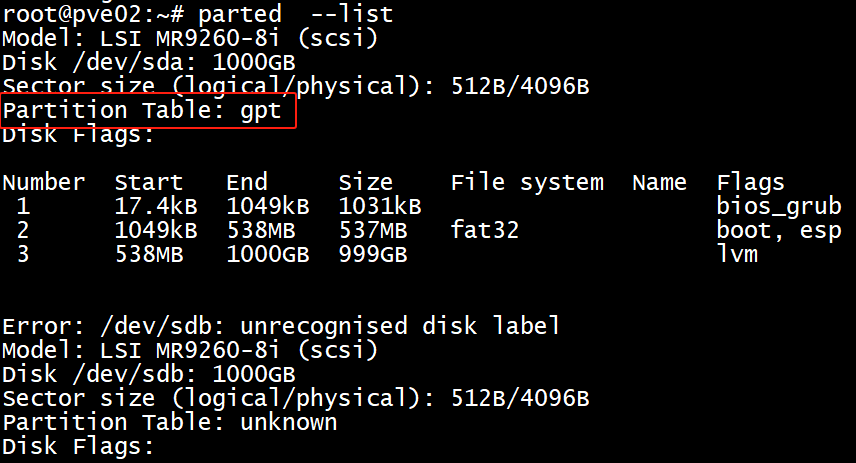
Linux 使用 parted -l

Partition Table: msdos                  # MBR分区表格式

Partition Table: gpt                        # GPT分区表格式(GUID Partition Table) 

Partition Table: loop                      # 对一整块磁盘直接创建文件系统使用,这样的磁盘的分区表类型就会显示成loop

Partition Table: unknown               # 一般一个新磁盘可能会显示成 unknown

IOPS 、吞吐量 (单位时间内的输入输出和传输总量)

  • 磁盘IOPS(Input/Output Operations Per Second,每秒输入输出操作次数)和吞吐量是衡量存储系统性能的两个重要指标。它们各自反映了存储设备在不同应用场景下的能力。
  • IOPS
  • 定义:IOPS是指单位时间内系统能够处理的读写请求数量。它通常用来描述随机访问工作负载的性能,比如数据库操作。
  • 影响因素
    • 队列深度:指同时可以处理的IO请求的数量。较高的队列深度可能增加IOPS。
    • 数据块大小:对于小的数据块,如4KB或更小,IOPS值较高;而对于大的数据块,则吞吐量更为关键。
    • 缓存命中率:如果大量请求能从缓存中得到满足而不是直接从物理介质上读取,那么IOPS将显著提高。
    • 并发度:多个线程或进程同时进行读写操作时的效率也会影响IOPS。
  • 应用场景:适用于需要快速响应时间的应用程序,例如在线事务处理(OLTP)系统、邮件服务器等。
  • 吞吐量
  • 定义:吞吐量指的是单位时间内可以传输的数据量,通常以MB/s (兆字节每秒) 或 GB/s (吉字节每秒) 来衡量。它是评价顺序读写速度的一个好方法。
  • 影响因素
    • 带宽限制:硬盘接口类型(SATA, SAS, NVMe等)决定了最大理论上的吞吐量。
    • 数据块大小:较大的数据块有利于提高吞吐量。
    • 文件系统开销:某些文件系统可能会引入额外开销从而降低实际可达到的吞吐量。
    • 存储介质特性:SSD相比HDD具有更高的吞吐量。
  • 应用场景:适合于大数据分析、视频流媒体服务等领域,在这些场景下,大量的连续数据被读取或者写入。
  • 总结
  • 简单来说,IOPS关注的是每秒钟可以完成多少次读写操作,而吞吐量则侧重于这些操作能够移动多少数据。选择合适的存储解决方案时,应根据具体应用的需求来权衡这两个方面。例如,对于需要频繁但小规模访问的工作负载,高IOPS可能是优先考虑的因素;而对于那些涉及大文件传输的任务,则更加重视吞吐量的表现。
  • 使用 PowerShell
  • PowerShell提供了强大的命令行接口,通过它可以查询到更详细的性能数据。
  • 查看IOPS:Get-Counter -Counter "\PhysicalDisk(_Total)\Disk Reads/sec","\PhysicalDisk(_Total)\Disk Writes/sec"
  • 查看吞吐量:Get-Counter -Counter "\PhysicalDisk(_Total)\Disk Read Bytes/sec","\PhysicalDisk(_Total)\Disk Write Bytes/sec"

Linux 使用sysstat 工具中的iostat -x 1 工具查看