- #新建一个通讯组
- New-DistributionGroup -Name “Test DL1” -DisplayName “Test DL1” -PrimarySmtpAddress adb@contoso.com
- #添加组成员
- Update-DistributionGroupMember -Identity “Test DL1” -Members user1hr,user2hr
- #设置所有者
- Set-DistributionGroup -Identity “Test DL1” -ManagedBy User1HR,User2HR
- #查看组成员
- Get-DistributionGroupMember -Identity “Test DL1” | Select-Object Displayname,PrimarySmtpAddress
- #添加发送权限Add Send As permission on distribution group
- Add-RecipientPermission -Identity “Test DL1” -Trustee User1HR -AccessRights SendAs
- #添加通讯组的代表发送权限
- Set-DistributionGroup -Identity “Test DL1″ -GrantSendOnBehalfTo @{Add=”User1HR”}
- #允许外部邮件发送给通讯组 Set distribution group to accept emails from outside organization
- Set-DistributionGroup -Identity “Test DL1” -RequireSenderAuthenticationEnabled $false
- #允许某个用户或者组中用户发送给通讯组
- Set-DistributionGroup -Identity “Test DL1” -AcceptMessagesOnlyFrom “User1HR”
- Set-DistributionGroup -Identity “Test DL1” -AcceptMessagesOnlyFromDLMembers “DL10”
- #通过csv 文件导入通讯组成员
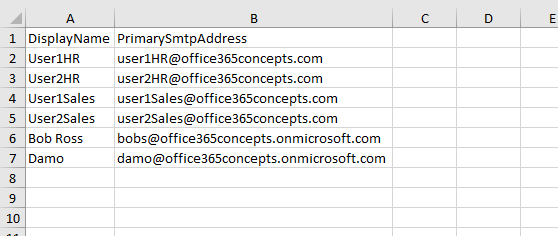
$Users = Import-Csv "C:\CSV File\GroupMembers.csv"

ForEach ($User in $Users)

{

Add-DistributionGroupMember -Identity "Test DL1" -Member $User.PrimarySmtpAddress

}
#查看某个用户归属的通讯组
$User = “Type UserName Here"
$UserName = (Get-Mailbox $User).name
ForEach ($DistributionGroup in Get-Distributiongroup -resultsize unlimited)
{
    if ((Get-Distributiongroupmember $DistributionGroup.identity | select -expand name) -contains $UserName)
    {
    $DistributionGroup.name
}
}
#复制通讯组成员到安全组
# Specify the name of the distribution group and security group
$DistributionGroupName = "Test DL1"
$SecurityGroupName = "TestSecurityGroup"

# Get members of the distribution group
$DistributionGroupMembers = Get-DistributionGroupMember -Identity $DistributionGroupName

# Add members to the security group
foreach ($member in $DistributionGroupMembers) {
    Add-DistributionGroupMember -Identity $SecurityGroupName -Member $member

    # Retrieve the DisplayName and PrimarySmtpAddress of the user
    $user = Get-Recipient -Identity $member
    Write-Host "Added $($user.DisplayName) ($($user.PrimarySmtpAddress)) to $SecurityGroupName"
}

Write-Host "Members copied from $DistributionGroupName to $SecurityGroupName successfully."
#设置某个用户成为所有通讯组的所有者
# Specify the user to set as the owner
$ownerUser = "Bob Ross"

# Get all distribution groups
$distributionGroups = Get-DistributionGroup -ResultSize Unlimited

foreach ($group in $distributionGroups) {
    # Set the owner for each distribution group
    Set-DistributionGroup -Identity $group.Identity -ManagedBy $ownerUser -BypassSecurityGroupManagerCheck
    Write-Host "Set $ownerUser as the owner of $($group.DisplayName)"
}
##从所有通讯组中删除特定成员
# Specify the member you want to remove from distribution groups
$memberToRemove = "bobs@office365concepts.onmicrosoft.com"
# Get all distribution groups
$distributionGroups = Get-DistributionGroup -ResultSize Unlimited
foreach ($group in $distributionGroups) {
    # Check if the member is a member of the group
    if (Get-DistributionGroupMember -Identity $group.Identity | Where-Object {$_.PrimarySmtpAddress -eq $memberToRemove}) {
        # Remove the member from the distribution group
        Remove-DistributionGroupMember -Identity $group.Identity -Member $memberToRemove -Confirm:$false
        Write-Host "Removed $memberToRemove from $($group.DisplayName)"
    }
}
#使用csv 从所有通讯组中删除用户
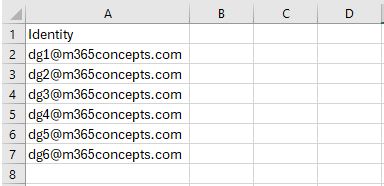
# Read the CSV file
$groups = Import-Csv -Path "C:\CSV Files\RemoveMembers.csv"

foreach ($group in $groups) {
    # Get members of the distribution group
    $members = Get-DistributionGroupMember -Identity $group.Identity

    # Remove each member from the distribution group
    foreach ($member in $members) {
        Remove-DistributionGroupMember -Identity $group.Identity -Member $member.PrimarySmtpAddress -Confirm:$false
        Write-Host "Removed $($member.PrimarySmtpAddress) from $($group.DisplayName)"
    }
}
#替换通讯组owner
# Specify the current owner and the new owner
$currentOwner = "currentowner@example.com"
$newOwner = "newowner@example.com"

# Get all distribution groups owned by the current owner
$groupsOwnedByCurrentOwner = Get-DistributionGroup -ResultSize Unlimited | Where-Object {$_.ManagedBy -eq $currentOwner}

foreach ($group in $groupsOwnedByCurrentOwner) {
    # Set the new owner for the distribution group
    Set-DistributionGroup -Identity $group.Identity -ManagedBy $newOwner -BypassSecurityGroupManagerCheck
    Write-Host "Changed owner of $($group.DisplayName) from $currentOwner to $newOwner"
}

or

# Specify the current owner and the new owner
$currentOwner = "Bob Ross"
$newOwner = "User1HR"

# Get all distribution groups owned by the current owner
$groupsOwnedByCurrentOwner = Get-DistributionGroup -ResultSize Unlimited | Where-Object {$_.ManagedBy -eq $currentOwner}

foreach ($group in $groupsOwnedByCurrentOwner) {
    # Set the new owner for the distribution group
    Set-DistributionGroup -Identity $group.Identity -ManagedBy $newOwner -BypassSecurityGroupManagerCheck
    Write-Host "Changed owner of $($group.DisplayName) from $currentOwner to $newOwner"
}
#查看过去某个时刻创建的通讯组
# Calculate the date 3 days ago
$startDate = (Get-Date).AddDays(-3)

# Get distribution groups created in the last 3 days
$groups = Get-DistributionGroup -ResultSize Unlimited | Where-Object {$_.WhenCreated -ge $startDate}

# Output the distribution groups created in the last 3 days
if ($groups -ne $null) {
    Write-Host "Distribution groups created in the last 3 days:"
    $groups | Select-Object DisplayName, PrimarySmtpAddress, WhenCreated
} else {
    Write-Host "No distribution groups created in the last 3 days."
}

# Calculate the date 100 hours ago
$startDate = (Get-Date).AddHours(-100)

# Get distribution groups created in the last 100 hours
$groups = Get-DistributionGroup -ResultSize Unlimited | Where-Object {$_.WhenCreated -ge $startDate}

# Output the distribution groups created in the last 100 hours
if ($groups -ne $null) {
    Write-Host "Distribution groups created in the last 100 hours:"
    $groups | Select-Object DisplayName, PrimarySmtpAddress, WhenCreated
} else {
    Write-Host "No distribution groups created in the last 100 hours."
}

# Calculate the date 4 weeks ago
$startDate = (Get-Date).AddDays(-28)

# Get distribution groups created in the last 4 weeks
$groups = Get-DistributionGroup -ResultSize Unlimited | Where-Object {$_.WhenCreated -ge $startDate}

# Output the distribution groups created in the last 4 weeks
if ($groups -ne $null) {
    Write-Host "Distribution groups created in the last 4 weeks:"
    $groups | Select-Object DisplayName, PrimarySmtpAddress, WhenCreated
} else {
    Write-Host "No distribution groups created in the last 4 weeks."
}
参考链接:
https://office365concepts.com/manage-distribution-groups-with-powershell