- OSPF 多区域、
- OSPF 过滤、
- OSPF cost参考带宽修改、

核心和汇聚都使用VRRP 和防火墙互联、防火墙配置成主备模式。核心、汇聚、防火墙之间使用静态路由;在核心设备上将静态路由引入至OSPF。
核心和汇聚都使用VRRP 和防火墙互联、防火墙配置成主备模式。核心、汇聚、防火墙之间使用静态路由;在核心设备上将静态路由引入至OSPF。
vlan 101 为企业内网用户、通过企业自建骨干网访问总部网络10.113.0.0/24 、不允许访问Internet ;
vlan 201 为IneterNet用户、不允许访问企业总部网络10.113.0.0/24 、允许访问InterNet.
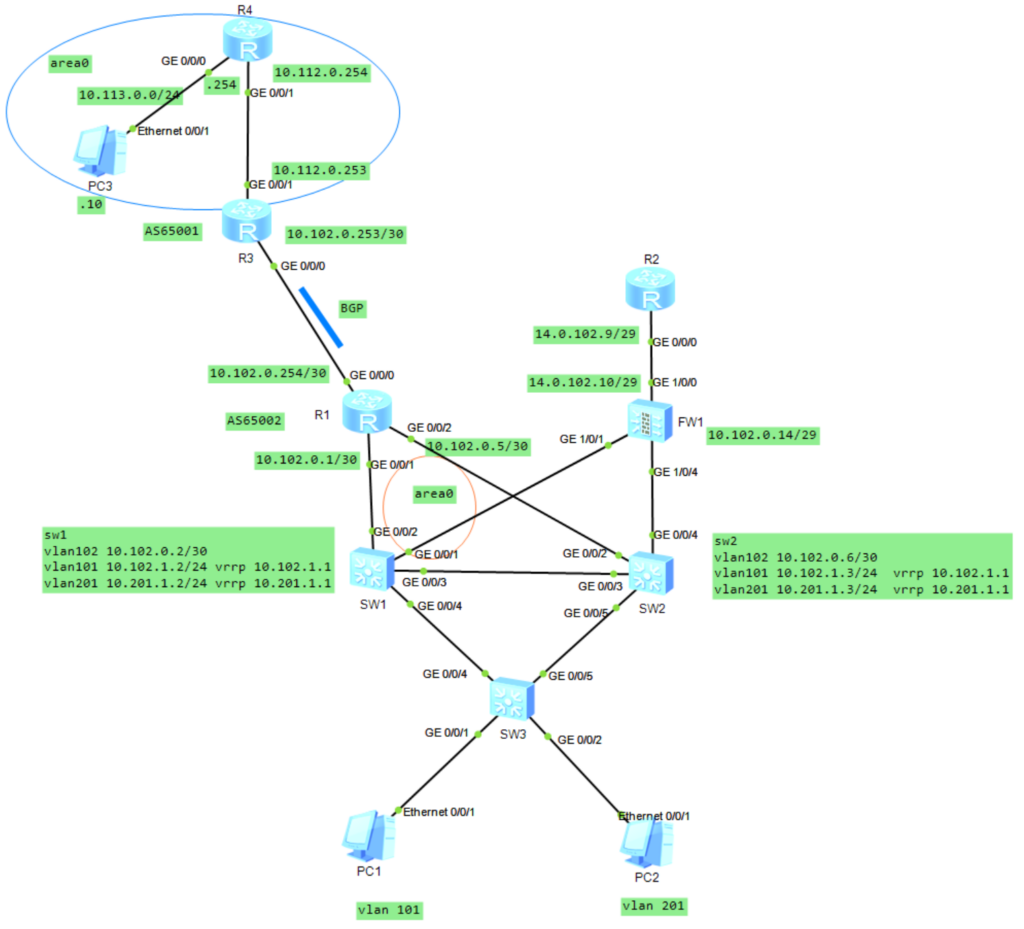
R4配置
interface GigabitEthernet0/0/0
 ip address 10.113.0.254 255.255.255.0
#
interface GigabitEthernet0/0/1
 ip address 10.112.0.254 255.255.255.252
#
interface LoopBack0
 ip address 10.100.254.252 255.255.255.255
#
ospf 100 router-id 10.100.254.252
 area 0.0.0.0
  network 10.112.0.254 0.0.0.0
  network 10.113.0.0 0.0.0.255

R3配置
interface GigabitEthernet0/0/0
 description to-fenzhi
 ip address 10.102.0.253 255.255.255.252
#
interface GigabitEthernet0/0/1
 ip address 10.112.0.253 255.255.255.252
#
interface LoopBack0
 ip address 10.100.254.253 255.255.255.255
#
bgp 65001
 router-id 10.100.254.253
 peer 10.102.0.254 as-number 65002
 peer 10.102.0.254 connect-interface GigabitEthernet0/0/0
 #
 ipv4-family unicast
  undo synchronization
  import-route ospf 100
  peer 10.102.0.254 enable
#
ospf 100 router-id 10.100.254.253
 import-route bgp
 area 0.0.0.0
  network 10.112.0.253 0.0.0.0

R1配置
interface GigabitEthernet0/0/0
 ip address 10.102.0.254 255.255.255.252
#
interface GigabitEthernet0/0/1
 ip address 10.102.0.1 255.255.255.252
#
interface GigabitEthernet0/0/2
 ip address 10.102.0.5 255.255.255.252
#
interface LoopBack0
 ip address 10.102.0.101 255.255.255.255
#
bgp 65002
 router-id 10.102.0.101
 peer 10.102.0.253 as-number 65001
 peer 10.102.0.253 connect-interface GigabitEthernet0/0/0
 #
 ipv4-family unicast
  undo synchronization
  network 10.102.0.0 255.255.0.0
  peer 10.102.0.253 enable
#
ospf 102 router-id 10.102.0.101
 import-route bgp
 area 0.0.0.0
  network 10.102.0.1 0.0.0.0
  network 10.102.0.5 0.0.0.0
  network 10.102.0.101 0.0.0.0
#
ip route-static 10.102.0.0 255.255.0.0 NULL0 preference 255

SW1的配置
vlan batch 10 101 to 104 201 to 204
#
stp instance 1 priority 0
stp instance 2 priority 4096
#
stp region-configuration
 region-name name01
 instance 1 vlan 101 to 104
 instance 2 vlan 201 to 204
 active region-configuration
#
interface Vlanif10
 ip address 10.102.0.10 255.255.255.248
 vrrp vrid 10 virtual-ip 10.102.0.9
 vrrp vrid 10 priority 110
#
interface Vlanif101
 description neiwang
 ip address 10.102.1.2 255.255.255.0
 vrrp vrid 101 virtual-ip 10.102.1.1
 vrrp vrid 101 priority 120
#
interface Vlanif102
 description neiwang
 ip address 10.102.0.2 255.255.255.252
#
interface Vlanif201
 description to-waiwang
 ip address 10.201.1.2 255.255.255.0
 vrrp vrid 201 virtual-ip 10.201.1.1
 vrrp vrid 201 priority 110
#
interface GigabitEthernet0/0/1
 port link-type trunk
 port trunk allow-pass vlan 10
#
interface GigabitEthernet0/0/2
 description to-r1
 port link-type access
 port default vlan 102
#
interface GigabitEthernet0/0/3
 description to-sw2
 port link-type trunk
 port trunk allow-pass vlan 10 101 to 104 201 to 204
#
interface GigabitEthernet0/0/4
 description to-sw3
 port link-type trunk
 port trunk allow-pass vlan 101 to 104 201 to 204
#
interface LoopBack0
 ip address 10.102.0.102 255.255.255.255
#
ospf 100 router-id 10.102.0.102
 silent-interface all
 undo silent-interface GigabitEthernet0/0/2
 undo silent-interface Vlanif102
 area 0.0.0.0
  network 10.102.0.2 0.0.0.0
  network 10.102.1.0 0.0.0.255
#
ip route-static 0.0.0.0 0.0.0.0 10.102.0.14
SW2配置
vlan batch 10 101 to 104 201 to 204
#
stp instance 1 priority 4096
stp instance 2 priority 0
#
stp region-configuration
 region-name name01
 instance 1 vlan 101 to 104
 instance 2 vlan 201 to 204
 active region-configuration
#
interface Vlanif10
 ip address 10.102.0.11 255.255.255.248
 vrrp vrid 10 virtual-ip 10.102.0.9
 vrrp vrid 10 priority 120
#
interface Vlanif101
 ip address 10.102.1.3 255.255.255.0
 vrrp vrid 101 virtual-ip 10.102.1.1
#
interface Vlanif102
 ip address 10.102.0.6 255.255.255.252
#
interface Vlanif201
 description to-waiwang
 ip address 10.201.1.3 255.255.255.0
 vrrp vrid 201 virtual-ip 10.201.1.1
 vrrp vrid 201 priority 120
#
interface GigabitEthernet0/0/2
 description toR1
 port link-type access
 port default vlan 102
#
interface GigabitEthernet0/0/3
 description to-sw1
 port link-type trunk
 port trunk allow-pass vlan 10 101 to 104 201 to 204
#
interface GigabitEthernet0/0/4
 port link-type trunk
 port trunk allow-pass vlan 10
#
interface GigabitEthernet0/0/5
 description to-sw3
 port link-type trunk
 port trunk allow-pass vlan 101 to 104 201 to 204
#
interface LoopBack0
 ip address 10.102.0.103 255.255.255.255
#
ospf 100 router-id 10.102.0.103
 silent-interface all
 undo silent-interface Vlanif102
 undo silent-interface GigabitEthernet0/0/2
 area 0.0.0.0
  network 10.102.0.6 0.0.0.0
  network 10.102.1.0 0.0.0.255
#
ip route-static 0.0.0.0 0.0.0.0 10.102.0.14

sw3配置
vlan batch 101 201
#
interface GigabitEthernet0/0/1
 port link-type access
 port default vlan 101
#
interface GigabitEthernet0/0/2
 port link-type access
 port default vlan 201
#
interface GigabitEthernet0/0/4
 description to-sw1
 port link-type trunk
 port trunk allow-pass vlan 101 to 104 201 to 204
#
interface GigabitEthernet0/0/5
 description to-sw2
 port link-type trunk
 port trunk allow-pass vlan 101 to 104 201 to 204

fw1配置
vlan batch 10
#
interface Vlanif10
 ip address 10.102.0.14 255.255.255.248
 service-manage ping permit
#
interface GigabitEthernet1/0/0
 undo shutdown
 ip address 14.0.102.10 255.255.255.248
 service-manage ping permit
#
interface GigabitEthernet1/0/1
 portswitch
 description to-sw1
 undo shutdown
 port link-type trunk
 port trunk allow-pass vlan 10
#
interface GigabitEthernet1/0/4
 portswitch
 description to-sw2
 undo shutdown
 port link-type trunk
 port trunk allow-pass vlan 10
#
firewall zone trust
 set priority 85
 add interface GigabitEthernet0/0/0
 add interface GigabitEthernet1/0/1
 add interface GigabitEthernet1/0/4
 add interface Vlanif10
#
firewall zone untrust
 set priority 5
 add interface GigabitEthernet1/0/0
#
ip route-static 0.0.0.0 0.0.0.0 14.0.102.9
ip route-static 10.201.1.0 255.255.255.0 10.102.0.9
#
security-policy
 rule name permit-ping
  source-zone local
  service icmp
  action permit
 rule name permit-t-u
  source-zone trust
  destination-zone untrust
  source-address 10.201.1.0 mask 255.255.255.0
  action permit
#
nat-policy
 rule name nat01
  source-zone trust
  egress-interface GigabitEthernet1/0/0
  action source-nat easy-ip
R2配置
#
interface GigabitEthernet0/0/0
 ip address 14.0.102.9 255.255.255.0
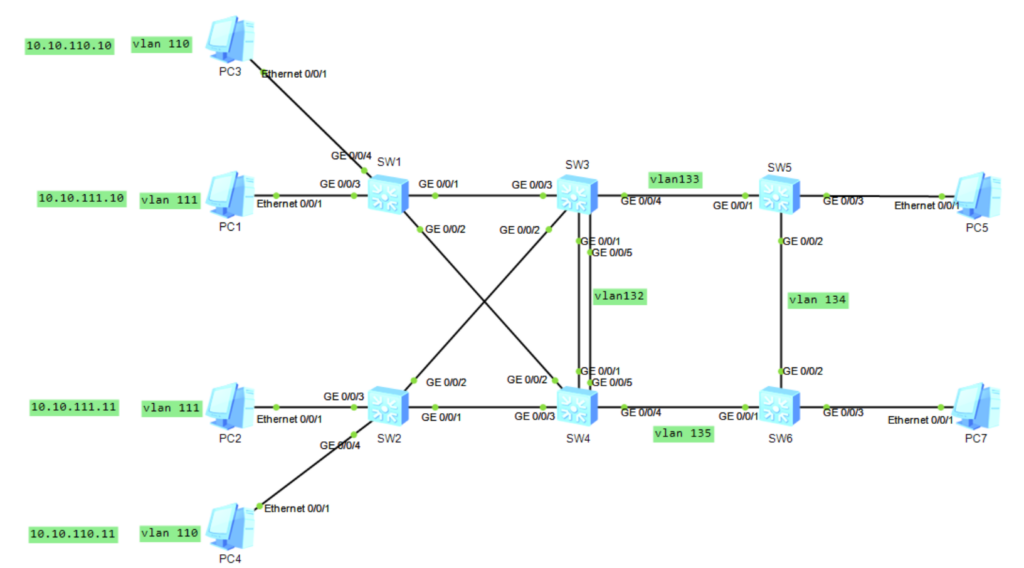
| 业务地点 | 业务vlan | sw3 | sw4 | 默认网关 |
| 生产办公室 | vlan110 | 10.10.110.2 | 10.10.110.3 | 10.10.110.1 |
| 质量中心 | vlan111 | 10.10.111.2 | 10.10.111.3 | 10.10.111.1 |
| 设备管理地址 | vlan132 | 10.10.132.2 | 10.10.132.3 | 10.10.132.1 |
| 本地设备 | 本地端口 | 对端设备 | 对端端口 | Vlan | Trunk |
| sw3 | g0/0/1 | sw4 | g0/0/1 | v | |
| g0/0/2 | sw2 | g0/0/2 | v | ||
| g0/0/3 | sw1 | g0/0/1 | v | ||
| g0/0/4 | sw5 | g0/0/1 | v | ||
| g0/0/5 | sw4 | g0/0/5 | v | ||
| sw4 | g0/0/1 | sw3 | g0/0/1 | v | |
| g0/0/2 | sw1 | g0/0/2 | v | ||
| g0/0/3 | sw2 | g0/0/1 | v | ||
| g0/0/4 | sw6 | g0/0/1 | v | ||
| g0/0/5 | sw3 | g0/0/5 | v | ||
| sw5 | g0/0/2 | sw6 | g0/0/2 | v |
telnet server enable
user-interface vty 0 4
protocol inbound telnet
authentication-mode password
set authentication password cipher admin@123
user privilege level 15
vlan batch 110 to 111 132
lldp enable
stp mode mstp
interface GigabitEthernet0/0/1
port link-type trunk
port trunk allow-pass vlan 110 to 111 132
undo port trunk allow-pass vlan 1
unicast-suppression 30
multicast-suppression 30
broadcast-suppression 30
storm-control broadcast min-rate 5000 max-rate 8000
storm-control action block
storm-control enable trap
quit
interface GigabitEthernet0/0/2
port link-type trunk
port trunk allow-pass vlan 110 to 111 132
undo port trunk allow-pass vlan 1
unicast-suppression 30
multicast-suppression 30
broadcast-suppression 30
storm-control broadcast min-rate 5000 max-rate 8000
storm-control action block
storm-control enable trap
quit
interface GigabitEthernet0/0/3
port link-type access
port default vlan 111
stp edge-port enable
quit
interface GigabitEthernet0/0/4
port link-type access
port default vlan 110
stp edge-port enable //不参与生成树计算,但转发bpdu报文
quit
port-group 1
group-member g0/0/5 to g0/0/24
stp edge-port enable
quit
stp region-configuration
region-name name01
instance 1 vlan 111
instance 2 vlan 110
active region-configuration
quit
路由配置sw1
interface Vlanif132
ip address 10.10.132.11 255.255.255.0
ip route-static 0.0.0.0 0.0.0.0 10.10.132.1
路由配置sw2
interface Vlanif132
ip address 10.10.132.12 255.255.255.0
ip route-static 0.0.0.0 0.0.0.0 10.10.132.1
vlan batch 110 to 111 130 to 133
lldp enable
stp mode mstp
interface Eth-Trunk1
port link-type trunk
port trunk allow-pass vlan 110 to 111 132
load-balance src-dst-mac
trunkport GigabitEthernet 0/0/1
trunkport GigabitEthernet 0/0/5
quit
port-group 1
group-member g0/0/2 to g0/0/3
port link-type trunk
port trunk allow-pass vlan 110 111 132
undo port trunk allow-pass vlan 1
quit
stp region-configuration
region-name name01
instance 1 vlan 111
instance 2 vlan 110
active region-configuration
stp instance 1 priority 0
stp instance 2 priority 4096
quit
interface Vlanif110
ip address 10.10.110.2 255.255.255.0
vrrp vrid 110 virtual-ip 10.10.110.1
vrrp vrid 110 priority 100(缺省情况下,优先级的取值是100。数值越大,优先级越高。)
quit
interface Vlanif111
ip address 10.10.111.2 255.255.255.0
vrrp vrid 111 virtual-ip 10.10.111.1
vrrp vrid 111 priority 120
quit
interface Vlanif132
ip address 10.10.132.2 255.255.255.0
vrrp vrid 132 virtual-ip 10.10.132.1
vrrp vrid 132 priority 120
quit
interface Vlanif133
ip address 10.10.133.3 255.255.255.0
ospf network-type p2p
interface GigabitEthernet0/0/4
port link-type trunk
port trunk allow-pass vlan 132 to 135
stp disable
interface loopback0
ip address 3.3.3.3 32
ospf 100 router-id 3.3.3.3
silent-interface Vlanif110
silent-interface Vlanif111
area 0.0.0.0
network 10.10.132.0 0.0.0.255
network 10.10.133.0 0.0.0.255
network 10.10.110.0 0.0.0.255
network 10.10.111.0 0.0.0.255
sw4 配置vlan batch 110 to 111 132 135
lldp enable
stp mode mstp
interface Eth-Trunk1
port link-type trunk
port trunk allow-pass vlan 110 to 111 132
load-balance src-dst-mac
trunkport GigabitEthernet 0/0/1
trunkport GigabitEthernet 0/0/5
quit
port-group 1
group-member g0/0/2 to g0/0/3
port link-type trunk
port trunk allow-pass vlan 110 111 132
undo port trunk allow-pass vlan 1
quit
stp region-configuration
region-name name01
instance 1 vlan 111
instance 2 vlan 110
active region-configuration
stp instance 1 priority 4096
stp instance 2 priority 0
quit
interface Vlanif110
ip address 10.10.110.3 255.255.255.0
vrrp vrid 110 virtual-ip 10.10.110.1
vrrp vrid 110 priority 120
quit
interface Vlanif111
ip address 10.10.111.3 255.255.255.0
vrrp vrid 111 virtual-ip 10.10.111.1
vrrp vrid 111 priority 100
quit
interface Vlanif132
ip address 10.10.132.3 255.255.255.0
vrrp vrid 132 virtual-ip 10.10.132.1
vrrp vrid 132 priority 100
quit
interface Vlanif135
ip address 10.10.135.4 255.255.255.0
ospf network-type p2p
interface GigabitEthernet0/0/4
stp disable
port link-type trunk
port trunk allow-pass vlan 132 to 135
interface LoopBack0
ip address 4.4.4.4 255.255.255.255
ospf 100 router-id 4.4.4.4
silent-interface Vlanif110
silent-interface Vlanif111
area 0.0.0.0
network 10.10.132.0 0.0.0.255
network 10.10.135.0 0.0.0.255
network 10.10.110.0 0.0.0.255
network 10.10.111.0 0.0.0.255
sw5配置
sysname sw5
vlan batch 133 to 134
undo info-center enable
interface Vlanif133
 ip address 10.10.133.5 255.255.255.0
 ospf network-type p2p
interface Vlanif134
 ip address 10.10.134.5 255.255.255.0
 ospf network-type p2p
interface GigabitEthernet0/0/1
 port link-type trunk
 port trunk allow-pass vlan 132 to 135
 stp disable
interface GigabitEthernet0/0/2
 port link-type trunk
 port trunk allow-pass vlan 132 to 135
 stp disable
interface GigabitEthernet0/0/3
 port link-type access
 port default vlan 134
interface LoopBack0
 ip address 5.5.5.5 255.255.255.255
ospf 100 router-id 5.5.5.5
 area 0.0.0.0
  network 10.10.133.0 0.0.0.255
  network 10.10.134.0 0.0.0.255
sysname sw6
undo info-center enable
vlan batch 134 to 135
interface Vlanif134
 ip address 10.10.134.6 255.255.255.0
 ospf network-type p2p
interface Vlanif135
 ip address 10.10.135.6 255.255.255.0
 ospf network-type p2p
interface GigabitEthernet0/0/1
 port link-type trunk
 port trunk allow-pass vlan 132 to 135
 stp disable
interface GigabitEthernet0/0/2
 port link-type trunk
 port trunk allow-pass vlan 132 to 135
 stp disable
interface GigabitEthernet0/0/3
 port link-type access
 port default vlan 134
interface LoopBack0
 ip address 6.6.6.6 255.255.255.255
ospf 100 router-id 6.6.6.6
 area 0.0.0.0
  network 10.10.134.0 0.0.0.255
  network 10.10.135.0 0.0.0.255
修改ospf 路径选择
 ospf 1
nexthop 10.1.2.2 weight 1
quit
https://blog.csdn.net/qq_40909772/article/details/115645674
https://geekdaxue.co/books/lcheng@hcie
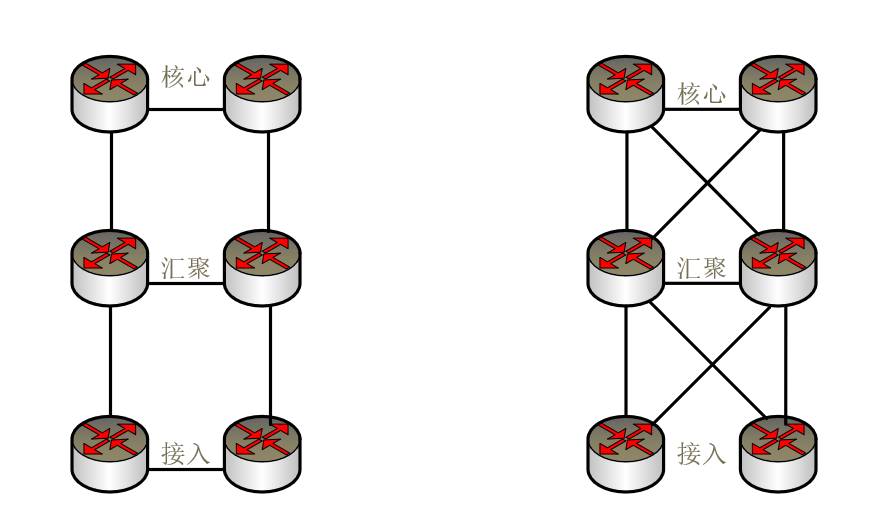
做互联网的连接,要考虑远距离传输问题,有成本、网络可靠性的一些考虑。如果预算比较低,对网络可靠性要求一般,就推荐日子型组网。如果预算充足,对网络要求高可靠那么就推荐米子型组网。
物理层面分为设备冗余和链路冗余,日字型和交叉型都满足设备和链路冗余,两种拓扑都有冗余能力,都不存在单点故障。。因为交叉型网络设备之间的互联链路更多所以交叉型较日字型冗余性更高。
网络流量设计分为:主备方式和负载均衡方式。
全互联在路由设计上对于IGP相较日字型邻居数量成倍增加。对于故障定位以及排障难度较大。
日字形较全互联拓扑简单,在日常管理运维方面更有优势,在日后存在增加节点的扩容需要时,也更容易实现,整体工期更可控。
两种模型各有各的优点,一般采用何种模型组网需要结合实际需求,费用,以及应用在何种场所,实际组网往往采用多种拓扑混合组网,比如上层核心之间采用全互联,下层接入之间采用口字形组网,汇聚之间可以采用双上联到核心层的方式。在某些互联资源紧张的环境下,比如:地铁沿线,也会采用环形组网。