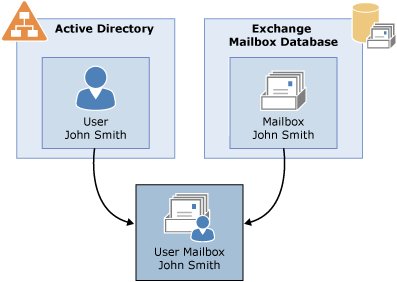
每个 Microsoft Exchange 邮箱都由 Active Directory 用户帐户以及存储在 Exchange 邮箱数据库中的邮箱数据组成。
- 禁用和删除邮箱的区别
- 禁用邮箱时,将从对应的 Active Directory 用户帐户中删除 Exchange 属性,但保留此用户帐户。
- 而删除邮箱之后,Exchange 属性和 Active Directory 用户帐户均会删除。
- 删除邮箱时, DisconnectReason 属性中的值也是
Disabled。 但是,对应的 Active Directory 用户帐户将会删除。 - 禁用邮箱时, DisconnectReason 属性中的值也是
Disabled。 但是,对应的 Active Directory 用户帐户将会保留下来。 - 恢复连接邮箱要保证 AD账户是存在的,最好是启用的。
- 查询邮箱数据库保留时长
- Get-MailboxDatabase | Select-Object Name ,MailboxRetention
- 查看断开连接的邮箱 (查看之前最好使用Update-StoreMailboxState)刷新数据库状态
- $dbs = Get-MailboxDatabase
- $dbs | foreach {Get-MailboxStatistics -Database $_.DistinguishedName} | where {$_.DisconnectReason -ne $null} | Format-Table DisplayName,Database,DisconnectDate
- 禁用邮箱demo01
- Get-MailboxStatistics -Identity demo01 | fl
- Disable-Mailbox -Identity demo01
- Get-ADUser -Identity demo01 (查看AD用户 状态)确保AD 用户在启用状态
- 刷新数据库状态
- Get-MailboxStatistics -Database DB1603 | Where { $_.DisconnectReason -ne $null } | ForEach { Update-StoreMailboxState -Database $_.Database -Identity $_.MailboxGuid -Confirm:$false }
- 查询禁用的邮箱
- $dbs = Get-MailboxDatabase
- $dbs | foreach {Get-MailboxStatistics -Database $_.DistinguishedName} | where {$_.DisconnectReason -ne $null} | Format-Table DisplayName,Database,DisconnectDate
- 连接邮箱 (Identity 参数最好使用displayname)
- Connect-Mailbox -Identity demo01 -Database DB1603 -User demon01
- 再次刷新数据库
- Get-MailboxStatistics -Database DB1603 | ForEach { Update-StoreMailboxState -Database $_.Database -Identity $_.MailboxGuid -Confirm:$false }
- 验证 Get-Mailbox -Identity demo01