- 外部测试
- 内部测试
- Test-Mailflow Ex2016-mbx1 -TargetMailboxServer Ex2016-mbx2 -MonitoringContext $true
- Test-Mailflow -TargetEmailAddress user01@abc.com
月度归档: 2019 年 10 月
Exchange 连接指定的DC
Set-ExchangeServer -identity mail.exchange.com -DomainController Ad.exchange.com
Exchange 健康检查
- 查询集群组
- Get-ClusterGroup
- 查询集群复制
- Test-ReplicationHealth
- 测试Ad连接情况
- Test-ActiveDirectoryConnectivity
- 测试安全通道
- Test-ComputerSecureChannel
- 获取DAG组所有数据库副本的复制状态
- (Get-DatabaseAvailabilityGroup) | ForEach {$_.Servers | ForEach {Get-MailboxDatabaseCopyStatus -Server $_}}
- (Get-DatabaseAvailabilityGroup) | ForEach {$_.Servers | ForEach {Test-ReplicationHealth -Server $_}}
- Get-MailboxDatabaseCopyStatus * | sort name | select name,status,contentindexstate
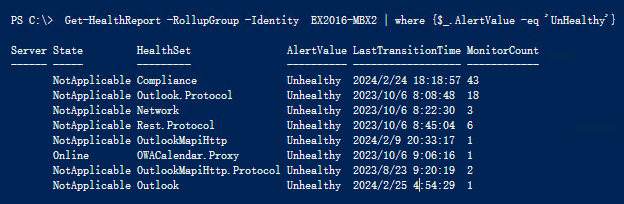
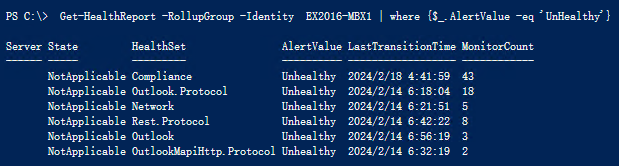
- 获取 健康报告
- Get-HealthReport -RollupGroup -Identity EX2016-MBX1 | where {$_.AlertValue -eq ‘UnHealthy’}
- 服务健康状况
- Test-ServiceHealth -Server EX2016-MBX2
- 服务器健康状况
- Get-ServerHealth -Identity EX2016-MBX2
- 服务器组件检查
- Get-ServerComponetState -Identity Exch01
Exchange 常用命令
- PowerShell 添加Exchange 管理单元
- 将一个或多个 Windows PowerShell 管理单元添加到当前会话中。
- Add-PSSnapIn -Name Microsoft.Exchange, Microsoft.Windows.AD
- 添加所有已注册的管理单元
- Get-PSSnapin -Registered | Add-PSSnapin -Passthru
- 将一个或多个 Windows PowerShell 管理单元添加到当前会话中。
- 新建邮箱
- New-Mailbox -UserPrincipalName libai@hello02.com -Alias libai -Database “db1601” -Name 李白 -OrganizationalUnit “ou=信息化部,ou=国务院,ou=China,dc=hello02,dc=com” -Password (convertto-securestring Admin909217 -asplaintext -force) -FirstName bai -LastName li -DisplayName “李白” -ResetPasswordOnNextLogon $true
- 查询UserMailbox,User
- Get-MailBox -Identity LiBai
- Get-Mailbox -Database db1601
- Get-Mailbox | where {$_.isvalid -eq $faluse} 查询禁用的邮箱
- Get-mailbox -OrganizationalUint it | Disable-Mailbox -Confirm:$false
- Get-User | where-object {$_.RecipientType -eq “UserMailbox”}
- Get-User | where-object {$_.RecipientType -eq “User”}
- 邮箱统计
- Get-mailboxStatistics -Identity ‘UserName’ | fl
- 删除添加通讯组中的成员
- Remove- DistributionGroupMember -idetity it -Member libai
- Add- DistributionGroupMember -identity it -Member libai
- 邮件追踪
- Get-TransportService | Get-MessageTrackingLog -Sender:user01@contoso.com -Recipients:use02@contoso.com -Start “2017/4/11 09:00:00” -End “2017/4/13 09:00:00” -EventId deliver | Select Sender,Recipients,timestamp,eventid,messagesubject
- 删除误发的群邮件
- Search-Mailbox -SearchQuery ‘From:user01@abc.com And Subject:”CCC”‘ -DeleteContent
- Get-Mailbox -ResultSize unlimited | Search-Mailbox -SearchQuery ‘Subject:”Download this file”‘ -DeleteContent
- 导出AD 禁用的用户
Get-ADUser -Filter {Enabled -eq “False”} |select UserPrincipalName |Export-Csv C:\Disable.csv -encoding utf8
Exchange 为组织中的邮箱所有者开启审核日志
赋予Administator 审核日志权限
New-ManagementRoleAssignment -Role ‘Audit Logs’ -User Administrator
- 为组织 中所有用户开启所有者审核日志
- $UserMailboxes = Get-mailbox -Filter “RecipientTypeDetails -eq ‘UserMailbox'” -ResultSize unlimited
- $UserMailboxes | ForEach {Set-Mailbox $_.Identity -AuditEnabled $true}
- $UserMailboxes | ForEach-Object {Set-Mailbox -Identity $_.Alias -AuditOwner @{add=’None,Create,SoftDelete,Update,Move,MoveToDeletedItems,MailboxLogin’ } }
- Get-Mailbox -Identity ‘UserName’ | Format-List *audit*
- 同步搜索输出所有者操作日志(可能 需要在EMS中执行)
- Search-MailboxAuditLog -Identity ‘UserName’ -StartDate “05/27/2021” -EndDate “06/27/2021” -LogonTypes owner –ShowDetails
- Search-MailboxAuditLog -Identity user01@abc.com -ResultSize 10 -ShowDetails | fl MailboxOwnerUPN, LogonType,LogonUserDisplayName, Operation,OperationResult, SourceItemSubjectsList,FolderPathName, DestFolderPathName,LastAccessed
- 异步搜索输出所有者操作日志
- New-MailboxAuditLogSearch “Admin and Delegate Access” -Mailboxes “Ken Kwok”,”April Stewart” -LogonTypes Admin,Delegate -StartDate 1/1/2018 -EndDate 12/31/2018 -StatusMailRecipients auditors@contoso.com
- New-MailboxAuditLogSearch cmdlet 异步搜索指定邮箱的邮箱审核日志,并通过电子邮件将搜索结果发送给指定收件人。 电子邮件的正文包含搜索元数据,如搜索参数和提交搜索请求的时间。 搜索结果附加在 .xml 文件中
- 审核日志的存放
- 邮箱审核日志针对每个启用了邮箱审核日志记录功能的邮箱而生成。 日志条目存储在已审核邮箱”可恢复邮件”文件夹的”审核”子文件夹中。 这样能够保证可以从一个位置获得全部审核日志条目,而无论使用哪种客户端访问方法来访问邮箱,或者管理员使用哪个服务器或计算机来访问邮箱审核日志。 如果将邮箱移至其他邮箱服务器,则由于邮箱中包含该邮箱的审核日志,因此这些审核日志也会移动到其他邮箱服务器。
- 默认情况下,邮箱审核日志条目在邮箱中保留 90 天,然后被删除
- Get-MailboxFolderStatistics “UserName” -FolderScope RecoverableItems | Format-List Name,FolderAndSubfolderSize