分为
- 协议日志
- 传输日志
- 路由日志
- 代理日志
- 连接日志
上述每种日志中分为前端传输服务、传输服务2种日志
分为
上述每种日志中分为前端传输服务、传输服务2种日志
在 Exchange 命令行管理程序中运行以下命令,以验证是否为 Exchange 服务器上的所有连接器启用或禁用协议日志记录:
Write-Host “Send Connectors:” -ForegroundColor yellow; Get-SendConnector | Format-List Name,ProtocolLoggingLevel; Write-Host “Receive Connectors:” -ForegroundColor yellow; Get-ReceiveConnector | Format-List Name,TransportRole,ProtocolLoggingLevel; Write-Host “Mailbox Transport Delivery service:” -ForegroundColor yellow; Get-MailboxTransportService | Format-List *ProtocolLoggingLevel; Write-Host “Front End Transport service:” -ForegroundColor yellow; Get-FrontEndTransportService | Format-List *ProtocolLoggingLevel; Write-Host “Transport service and Mailbox Transport Submission service:” -ForegroundColor yellow; Get-TransportService | Format-List *ProtocolLoggingLevel
入站邮件流不含Edge Server
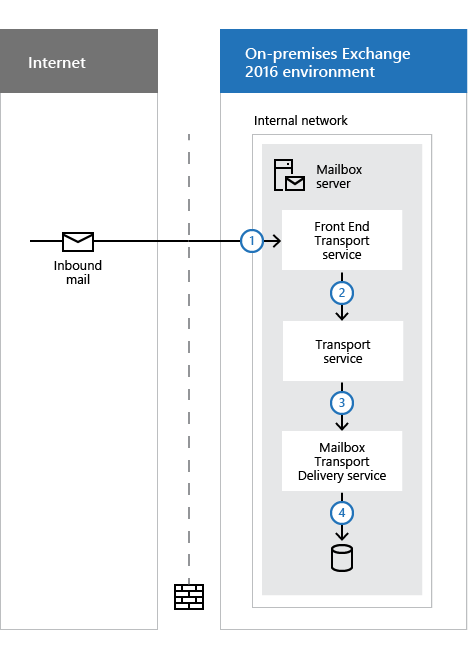
1、入站邮件首先到达 “Default Frontend <Mailbox Server Name> ” 接收连接器
2、此邮件被发送到本地邮箱服务器或其他邮箱服务器上的传输服务。 传输服务侦听名为“Default <Mailbox Server Name>”的默认接收连接器上的邮件。
3、邮件从传输服务发送到本地邮箱服务器或其他邮箱服务器上的邮箱传输传递服务(没有默认的接收连接器)
4、邮箱传输传递服务使用 RPC 将邮件传递到本地邮箱数据库。
出站邮件流不含Edge Server
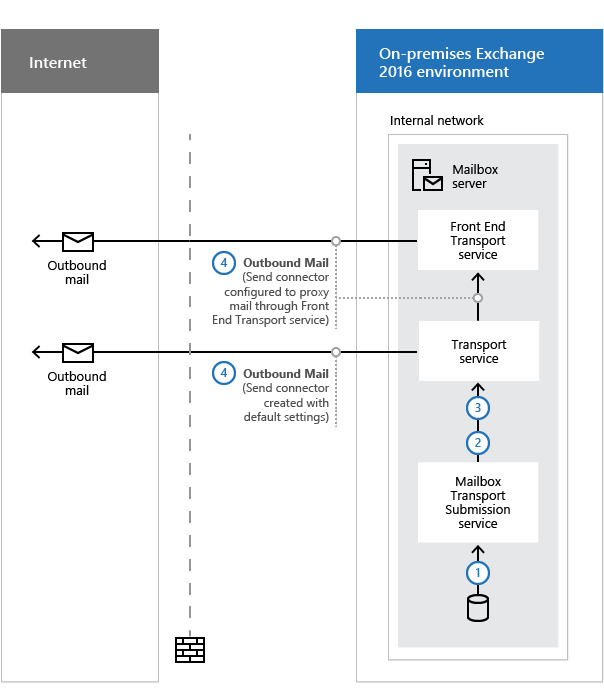
Exchange 连接器分为 发送、接收、传递代理、域外连接器4种
传递代理和传递代理连接器控制到非 SMTP 系统的传出邮件流。 传出邮件置于邮件队列中,用于传递到非 SMTP 系统。 传递代理和传递代理连接器因其改进的性能和管理而优于外部连接器
外部连接器控制到非 SMTP 系统的传出邮件流。 传出邮件将写入名为“放置目录”位置中的文件,由非 SMTP 系统进行选择。
接收连接器创建分为 :在前端传输服务和传输服务中创建的连接器。
前端传输服务中连接的TransportRole 属性值为FrontendTransport,传输服务中连接器的TransportRole属性值为HubTransPort;
前端传输服务将这些连接中继或 代理 到传输服务,以便进行分类和路由到最终目标。
使用类型决定接收连接器的默认安全设置。 使用类型指定谁有权使用连接器、他们所获取的权限以及受支持的身份验证方法。
Get-ReceiveConnector “My Internet ReceiveConnector” | Get-ADPermission -user “NT AUTHORITY\Anonymous Logon” | where {$_.ExtendedRights -like “ms-exch-smtp-accept-authoritative-domain-sender”} | Remove-ADPermission
参考:www.alitajran.com/configure-anonymous-smtp-relay-in-exchange-server/
New-ReceiveConnector -Server “EX01-2016” -Name “SMTP relay” -TransportRole FrontendTransport -Custom -Bindings 0.0.0.0:25 -RemoteIpRanges 192.168.1.60
Run both the commands to grant the minimum required permissions to allow anonymous relay.
Set-ReceiveConnector "EX01-2016\SMTP relay" -PermissionGroups AnonymousUsersCopy
Get-ReceiveConnector "EX01-2016\SMTP relay" | Add-ADPermission -User "NT AUTHORITY\ANONYMOUS LOGON" -ExtendedRights "Ms-Exch-SMTP-Accept-Any-Recipient"Run the below command to configure connections as externally secured to allow anonymous relay.
Set-ReceiveConnector “EX01-2016\SMTP Relay” -AuthMechanism ExternalAuthoritative -PermissionGroups ExchangeServers
测试匿名中继
$EmailMessage = @{
To = “info@alitajran.com”
From = “application@exoip.com”
Subject = “Test email”
Body = “Test email sent using Exchange SMTP relay”
SmtpServer = “relay.exoip.com”
Port = “25”
}
Send-MailMessage @EmailMessage
错误提示
Send-MailMessage : Mailbox unavailable. The server response was: 5.7.54 SMTP; Unable to relay recipient in non-accepted domain
At line:10 char:1
+ Send-MailMessage @EmailMessage
+ ~~~~~~~~~~~~~~~~~~~~~~~~~~~~~~
    + CategoryInfo          : InvalidOperation: (System.Net.Mail.SmtpClient:SmtpClient) [Send-MailMessage], SmtpFailedRecipientException
    + FullyQualifiedErrorId : SmtpException,Microsoft.PowerShell.Commands.SendMailMessage
Find IP addresses using Exchange SMTP relay
www.alitajran.com/find-ip-addresses-using-exchange-smtp-relay
接受域:也就是SMTP邮件中的地址空间,Dns中的注册域名,通常是组织中的权威域,默认域。接受域可以配置为中继域、权威域。
New-AcceptedDomain -Name <Name> -DomainName <DomainOrDomainWithSubdomains> -DomainType <Authoritative | InternalRelay | ExternalRelay>

不指定域的类型,默认为权威域。
Get-AcceptedDomain | Format-Table -Auto Name,DomainName,DomainType,Default,AddressBookEnabled