Ansible 读取外部数据

https://runebook.dev/zh/#docs

使用Lookup 查询节点数据

lookup()是Ansible的一个插件,可用于从外部读取数据,这里的”外部”含义非常广泛,比如:

(1).从磁盘文件读取(file插件)
(2).从redis中读取(redis插件)
(3).从etcd中读取(etcd插件)
(4).从命令执行结果读取(pipe插件)
(5).从Ansible变量中读取(vars插件)
(6).从Ansible列表中读取(list插件)
(7).从Ansible字典中读取(dict插件)

下面是lookup()的语法:

lookup('<plugin_name>', 'plugin_argument')
首先介绍fileglob插件,它使用通配符来通配Ansible本地端的文件名。

需注意的是,fileglob查询的是Ansible端文件,且只能通配文件而不能通配目录,且不会递归通配。如果想要查询目标主机上的文件,可以使用find模块。

---
- name: play1
  hosts: new
  gather_facts: false
  tasks: 
    - name: task1
      debug:
        msg: "filenames: {{lookup('fileglob','/etc/*.conf')}}"

再介绍file插件,这个插件用的应该是最多的,它用来读取Ansible本地端文件(这里本地端貌似不准确)。例如:

读取/etc/hosts 中的内容

---
- name: play1
  hosts: new
  gather_facts: false
  tasks: 
    - name: task1
      debug:
        msg: "file content: {{lookup('file','/etc/hosts')}}"

再者需要说明的是,如果lookup()查询出来的结果包含多项,则默认以逗号分隔各项的字符串方式返回,如果想要以列表方式返回,则传递一个lookup的参数wantlist=True。例如,fileglob通配出来的文件如果有多个,加上wantlist=True

在Ansible 2.5中添加了一个新的功能query()q(),后者是前者的等价缩写形式。query()在写法和功能上和lookup一致,其实它会自动调用lookup插件,并且总是以列表方式返回,而不需要手动加上wantlist=True参数。例如:

- name: task1
  debug:
    msg: "{{q('fileglob','/etc/*.conf')}}"

Ansible 连接主机方法

默认情况下,Ansible使用ssh去连接远程主机,但实际上它提供了多种插件来丰富连接方式:smart、ssh、paramiko、local、docker、winrm,默认为smart。

smart表示智能选择ssh和paramiko(paramiko是Python的一个ssh协议模块),当Ansible端安装的ssh支持ControlPersist(即持久连接)时自动使用ssh,否则使用paramiko。local和docker是非基于ssh连接的方式,winrm是连接Windows的插件。

可以在命令行选项中使用-c--connection选项来指定连接方式:

$ ansible nginx -c smart -m XXX -a ‘YYY’

$ ansible-playbook nginx -c smart -m XXX -a ‘YYY’

或者在playbook的play级别或task级别上指定连接方式,定义在task上时表示该task使用所指定的连接方式:

---
- hosts: nginx
  connection: smart
  ...
  tasks: 
    - copy: src=/etc/passwd dest=/tmp
      connection: local

此外,inventory中也可以通过连接的行为变量ansible_connection指定连接类型:

192.168.200.29 ansible_connection="smart"

通常,我们不需要关注连接类型,但是一种特殊的连接方式是local,它表示在Ansible端本地执行任务。例如:

---
- name: exec task at local
  hosts: new
  gather_facts: false
  connection: local
  tasks: 
    - name: task1
      debug: 
        msg: "{{inventory_hostname}} is executing task"
    - name: task2
      shell: touch /tmp/task1.txt
      args:
        creates: /tmp/task1.txt

connection和delegate_to指令

Ansible提供了另外一个指令:delegate_to,它表示将任务委托给谁去执行。显然connection: localdelegate_to: localhost在功能上是等价的。当然,connection可以定义在play级别或task级别上,而delegate_to只能定义在task级别上。

---
- name: play1
  hosts: new
  gather_facts: false
  tasks: 
    - name: task1
      debug: 
        msg: "{{inventory_hostname}} is executing task"
      delegate_to: 192.168.200.35

也许我们更深的疑惑是,为什么要使用connection: localdelegate_to,而不直接在被委托节点上执行任务?

主要原因在于委托执行时获取了目标节点的上下文环境。正如委托给Ansible端本地执行时,它是可以获取到目标节点信息的,而如果直接通过hosts: localhost指定在本地执行,则除了localhost外没有任何其它目标节点,也就无法获取到这些节点的信息,比如无法获取它们的IP地址。

Ansible 常用模块介绍

添加ssh信任

信任的主机添加在 默认的配置文件 /etc/ansible/hosts [nodes] 下

---
- name: configure ssh connection
  hosts: nodes
  gather_facts: false
  connection: local
  tasks:
    - name: configure ssh connection
      shell: |
        ssh-keyscan {{inventory_hostname}} >>~/.ssh/known_hosts
        sshpass -p'Thtf#997' ssh-copy-id root@{{inventory_hostname}}

首先要解释的是{{inventory_hostname}},其中{{}}在前面的文章中已经解释过了,它可以用来包围变量,在解析时会进行变量替换。而这里引用的变量为inventory_hostname,该变量表示的是当前正在执行任务的目标节点在inventory中定义的主机名。

command、shell、raw、script 模块介绍

command、shell、raw和script这四个模块的作用和用法都类似,都用于远程执行命令或脚本:
(1).command模块:执行简单的远程shell命令,但不支持解析特殊符号”< > | ; &”等,比如需要重定向时不能使用command模块,而应该使用shell模块
(2).shell模块:和command相同,但是支持解析特殊shell符号
(3).raw模块:执行底层shell命令。command和shell模块都是通过目标主机上的python代码启动/bin/sh来执行命令的,但目标主机上可能没有安装python,这时只能使用raw模块在远程主机上直接启动/bin/sh来执行命令,通常只有在目标主机上没有安装python时才使用raw模块,其它时候都不使用该模块
(4).script模块:在远程主机上执行脚本文件

---
- name: use some module
  hosts: new
  gather_facts: false
  tasks: 
    - name: use command module
      command: date +"%F %T"

    - name: use shell module
      shell: date +"%F %T" | cat >/tmp/date.log

    - name: use raw module
      raw: date +"%F %T"

如果要执行的命令有多行,根据之前文章中介绍的YAML语法,可以换行书写。例如:

---
- name: use some module
  hosts: new
  gather_facts: false
  tasks: 
    - name: use shell module
      shell: |
        date +"%F %T" | cat >/tmp/date.log
        date +"%F %T" | cat >>/tmp/date.log

如果想要看到命令的输出结果,可在执行playbook的时候加上一个-v选项:

$ ansible-playbook -v module.yaml

执行脚本

如果要执行的是一个远程主机上已经存在的脚本文件,可以使用shell、command或raw模块,但有时候脚本是写在Ansible控制端的,可以先将它拷贝到目标主机上再使用shell模块去执行这个脚本,但更佳的方式是使用script模块,script模块默认就是将Ansible控制端的脚本传到目标主机去执行的。此外,script模块和raw模块一样,不要求目标主机上已经装好python。

---
- name: use some module
  hosts: nodes
  gather_facts: false
  tasks:
    - name: use shell module
      script: /tmp/hello.sh  HELLOWORLD

幂等性

Ansible中绝大多数的模块都具有幂等特性,意味着执行一次或多次不会产生副作用。但是shell、command、raw、script这四个模块默认不满足幂等性,所以操作会重复执行,但有些操作是不允许重复执行的。例如mysql的初始化命令mysql_install_db,逻辑上它应该只在第一次配置的过程中初始化一次,其他任何时候都不应该再执行。所以,每当使用这4个模块的时候都要在心中想一想,重复执行这个命令会不会产生负面影响。

当然,除了raw模块外,其它三个模块也提供了实现幂等性的参数,即creates和removes:
(1).creates参数: 当指定的文件或目录存在时,则不执行命令
(2).removes参数: 当指定的文件或目录不存在时,则不执行命令

---
- name: use some module
  hosts: new
  gather_facts: false
  tasks: 
    # 网卡配置文件不存在时不执行
    - name: use command module
      command: ifup eth0
      args: 
        removes: /etc/sysconfig/network-scripts/ifcfg-eth0

    # mysql配置文件已存在时不执行,避免覆盖
    - name: use shell module
      shell: cp /tmp/my.cnf /etc/my.cnf
      args: 
        creates: /etc/my.cnf

Ansible 清单inventories

概念

An inventory is a list of managed nodes, or hosts, that Ansible deploys and configures.

清单是受控的节点、主机。

但通常我们不会去修改这个配置项,如果在其它地方定义了inventory文件,可以直接在ansible的命令行中使用-i选项去指定我们自定义的inventory文件。

$ ansible -i /tmp/myinv.ini ...
$ ansible-playbook -i /tmp/myinv.ini ...

配置文件中的清单

 ansible 的配置文件为/etc/ansible/ansible.cfg,ansible 有许多参数,下面我们列出一些常见的参数:

inventory = /etc/ansible/hosts      #这个参数表示资源清单inventory文件的位置
library = /usr/share/ansible        #指向存放Ansible模块的目录,支持多个目录方式,只要用冒号(:)隔开就可以
forks = 5       #并发连接数,默认为5
sudo_user = root        #设置默认执行命令的用户
remote_port = 22        #指定连接被管节点的管理端口,默认为22端口,建议修改,能够更加安全
host_key_checking = False       #设置是否检查SSH主机的密钥,值为True/False。关闭后第一次连接不会提示配置实例
timeout = 60        #设置SSH连接的超时时间,单位为秒
log_path = /var/log/ansible.log     #指定一个存储ansible日志的文件(默认不记录日志)

创建清单

1、 直接指明主机地址或主机名:
## green.example.com#
# blue.example.com#
# 192.168.100.1
# 192.168.100.10
2、 定义一个主机组[组名]把地址或主机名加进去
[mysql_test]
192.168.253.159
192.168.253.160
192.168.253.153

清单的格式

Inventory basics: formats, hosts, and groups

You can create your inventory file in one of many formats, depending on the inventory plugins you have. The most common formats are INI and YAML.

清单的格式可以是INI和YAML

A basic INI /etc/ansible/hosts might look like this:

mail.example.com

[webservers]
foo.example.com
bar.example.com

[dbservers]
one.example.com
two.example.com
three.example.com

Here’s that same basic inventory file in YAML format:

ungrouped:
  hosts:
    mail.example.com:
webservers:
  hosts:
    foo.example.com:
    bar.example.com:
dbservers:
  hosts:
    one.example.com:
    two.example.com:
    three.example.com:

默认的组

Even if you do not define any groups in your inventory file, Ansible creates two default groups: all and ungrouped. The all group contains every host. The ungrouped group contains all hosts that don’t have another group aside from all. Every host will always belong to at least 2 groups (all and ungrouped or all and some other group). For example, in the basic inventory above, the host mail.example.com belongs to the all group and the ungrouped group; the host two.example.com belongs to the all group and the dbservers group. Though all and ungrouped are always present, they can be implicit and not appear in group listings like group_names

即使你没定义任何组在清单文件中,ansible 也会创建2个默认的组all、ungrouped。

Ansible默认预定义了两个主机组:all分组和ungrouped分组。
(1).all分组中包含所有分组内的节点
(2).ungrouped分组包含所有不在分组内的节点
(3).这两个分组都不包含localhost这个特殊的节点

ALL 组包含所有的主机。未定组ungrouped 包含除all 组中已经定义的主机,每台主机至少属于2个组(all和ungrouped) .例如上述的mail.example.com 属于all组和ungrouped 组。two.example.com 属于all组和dhservers组。

一台主机属于多个组

ungrouped:
  hosts:
    mail.example.com:
webservers:
  hosts:
    foo.example.com:
    bar.example.com:
dbservers:
  hosts:
    one.example.com:
    two.example.com:
    three.example.com:
east:
  hosts:
    foo.example.com:
    one.example.com:
    two.example.com:
west:
  hosts:
    bar.example.com:
    three.example.com:
prod:
  hosts:
    foo.example.com:
    one.example.com:
    two.example.com:
test:
  hosts:
    bar.example.com:
    three.example.com:

组的父子关系

ungrouped:
  hosts:
    mail.example.com:
webservers:
  hosts:
    foo.example.com:
    bar.example.com:
dbservers:
  hosts:
    one.example.com:
    two.example.com:
    three.example.com:
east:
  hosts:
    foo.example.com:
    one.example.com:
    two.example.com:
west:
  hosts:
    bar.example.com:
    three.example.com:
prod:
  children:
    east:
test:
  children:
    west:

定义主机组变量

有了主机组之后,可以直接为主机组定义变量,这样组内的所有主机都具有该变量。

[nginx]
192.168.200.27
192.168.200.28 ansible_password=123456
192.168.200.29

[nginx:vars]
ansible_password='123456'

[all:vars]
ansible_port=22

[ungrouped:vars]
ansible_port=22

上面[nginx:vars]表示为nginx组内所有主机定义变量ansible_password='123456'。而[all:vars][ungrouped:vars]分别表示为all和ungrouped这两个特殊的主机组内的所有主机定义变量。

组的嵌套

Inventory还支持主机组的分组嵌套,可以通过[GROUP:children]的方式定义一个主机组,并在其中包含子组。

例如:

[nginx]
192.168.200.27
192.168.200.28
192.168.200.29

[apache]
192.168.200.3[0:3]

[webservers:children]
nginx
apache

其中webservers主机组中包含了nginx组合apache组内的所有主机。

清单中主机名称的解析

例如,在默认的inventory文件/etc/ansible/hosts添加几个目标主机:

node1
node2 ansible_host=192.168.200.28
192.168.200.31
192.168.200.32:22
192.168.200.3[2:3] ansible_port=22

上面的inventory配置中:
(1).第一行通过主机名定义,在ansible连接该节点时会进行主机名DNS解析
(2).第二行也是通过主机名定义,但是使用了一个主机变量ansible_host=IP,此时Ansible去连接该主机时将直接通过IP地址进行连接,而不会进行DNS解析,所以此时的node2相当于是主机别名,它可以命名为任何其它名称,如node_2
(3).第三行通过IP地址定义主机节点
(4).第四行定义时还指定了端口号
(5).最后一行通过范围的方式展开成了两个主机节点192.168.200.32和192.168.200.33,同时还定义了这两个节点的主机变量ansible_port=22表示连接这两个节点时的端口号为22

范围表示      展开结果
-----------------------------
a[1:3]  -->     a1,a2,a3
[08:12] -->    08,09,10,11,12
a[a:c]  -->     aa,ab,ac

ansible 连接时的行为控制变量

例如上面的 ansible_port=22 ansible_port 就是控制变量,在每个版本中都不尽相同。

具体参考链接:https://docs.ansible.com/ansible/latest/inventory_guide/intro_inventory.html#connecting-to-hosts-behavioral-inventory-parameters

查看清单中的所有主机

ansible-inventory –graph all

要清单中添加变量

You can easily assign a variable to a single host and then use it later in playbooks. You can do this directly in your inventory file.

ini 文件格式

[atlanta]
host1 http_port=80 maxRequestsPerChild=808
host2 http_port=303 maxRequestsPerChild=909

yaml 文件格式

atlanta:
  hosts:
    host1:
      http_port: 80
      maxRequestsPerChild: 808
    host2:
      http_port: 303
      maxRequestsPerChild: 909

多个清单文件

You can also combine multiple inventory source types in an inventory directory. This can be useful for combining static and dynamic hosts and managing them as one inventory. The following inventory directory combines an inventory plugin source, a dynamic inventory script, and a file with static hosts:

inventory/
  openstack.yml          # configure inventory plugin to get hosts from OpenStack cloud
  dynamic-inventory.py   # add additional hosts with dynamic inventory script
  on-prem                # add static hosts and groups
  parent-groups          # add static hosts and groups

You can target this inventory directory as follows:
ansible-playbook example.yml -i inventory

例如,Ansible配置文件将inventory指令设置为对应的目录:

inventory      = /etc/ansible/inventorys

或者,ansible或ansible-playbook命令使用-i INVENTORY选项指定的路径应当为目录。

$ ansible-inventory -i /etc/ansible/inventorys --graph all

执行下面的命令将列出所有主机:

$ ansible-inventory -i /etc/ansible/inventorys --graph all
Ansible 剧本playbook

概念

Playbooks are automation blueprints, in YAML format, that Ansible uses to deploy and configure nodes in an inventory.

playbook 是自动化的蓝图,使用YAML 格式,用来配置和部署清单中的节点。

  • Executing tasks with elevated privileges or as a different user.
  • Using loops to repeat tasks for items in a list.
  • Delegating playbooks to execute tasks on different machines.
  • Running conditional tasks and evaluating conditions with playbook tests.
  • Using blocks to group sets of tasks.

playbook 、play、task 的关系

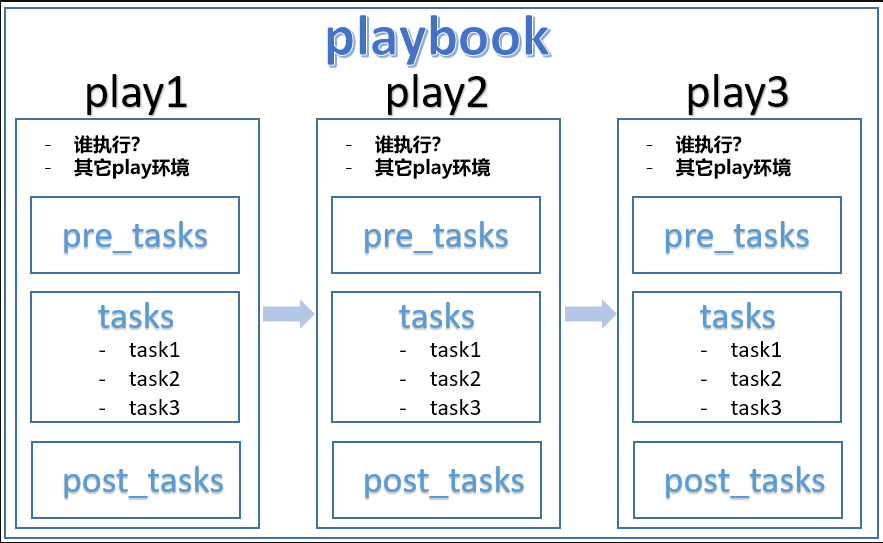
简单总结一下playbook、play和task的关系:
1.playbook中可以定义一个或多个play
2.每个play中可以定义一个或多个task

- 其中还可以定义两类特殊的task:pre_tasks和post_tasks  
- pre_tasks表示执行执行普通任务之前执行的任务列表  
- post_tasks表示普通任务执行完之后执行的任务列表  

3.每个play都需要通过hosts指令指定要执行该play的目标主机
4.每个play都可以设置一些该play的环境控制行为,比如定义play级别的变量

Yaml 语法

YAML的基本语法规则如下:
(1).使用缩进表示层级关系
(2).缩进时不允许使用Tab键,只允许使用空格
(3).缩进的空格数目不重要,只要相同层级的元素左对齐即可
(4).yaml文件以”—“作为文档的开始,以表明这是一个yaml文件

- 即使没有使用`---`开头,也不会有什么影响  

(5).# 表示注释,从这个字符一直到行尾,都会被解析器忽略
(6).字符串不用加引号,但在可能产生歧义时,需加引号(单双引号皆可),比如引用变量时
(7).布尔值非常灵活,不分区大小写的true/false、yes/no、on/off、y/n、0和1都允许

YAML支持三种数据结构:
(1).对象:key/value格式,也称为哈希结构、字典结构或关联数组
(2).数组:也称为列表
(3).标量(scalars):单个值

可以去找一些在线YAML转换JSON网站,比如 http://yaml-online-parser.appspot.com 通过在线转换可以验证或查看自己所写的YAML是否出错以及哪里出错。

对象

一组键值对,使用冒号隔开key和value。注意,冒号后必须至少一个空格

name: task1
等价于json:{
  "name": "task1"
}


数组

---
- Shell
- Perl
- Python
等价于json:

["Shell","Perl","Python"]

对象与数组结合

---
languages:
  - Shell
  - Perl
  - Python

字典
---
person1:
  name: task1
  age: 18
  gender: male

person2:
  name: task2
  age: 19
  gender: female

复合结构

---
- person1:
  name: task1
  age: 18
  langs:
    - Perl
    - Ruby
    - Shell

- person2:
  name: task2
  age: 19
  langs:
    - Python
    - Javascript

字符串续行

字符串可以写成多行,从第二行开始,必须至少有一个单空格缩进。换行符会被转为空格。

str: hello
  world
  hello world

等价于json:

{
  "str": "hello world hello world"
}

也可以使用 > 换行,它类似于上面的多层缩进写法。此外,还可以使用|在换行时保留换行符。

this: |
  Foo
  Bar
that: >
  Foo
  Bar

等价于json:

{‘that’: ‘Foo Bar’, ‘this’: ‘Foo\nBar\n’}


playbook 的组成

再来解释一下这个playbook文件的含义。

playbook中,每个play都需要放在数组中,所以在playbook的顶层使用列表的方式- xxx:来表示这是一个play(此处是- hosts:)。

每个play都必须包含hoststasks指令。

hosts指令用来指定要执行该play的目标主机,可以是主机名,也可以是主机组,还支持其它方式来更灵活的指定目标主机。具体的规则后文再做介绍。

tasks指令用来指定这个play中包含的任务,可以是一个或多个任务,任务也需要放在play的数组中,所以tasks指令内使用- xxx:的方式来表示每一个任务(此处是- copy:)。

gather_facts是一个play级别的指令设置,它是一个负责收集目标主机信息的任务,由setup模块提供。默认情况下,每个play都会先执行这个特殊的任务,收集完信息之后才开始执行其它任务。但是,收集目标主机信息的效率很低,如果能够确保playbook中不会使用到所收集的信息,可以显式指定gather_facts: no来禁止这个默认执行的收集任务,这对效率的提升是非常可观的。

此外每个play和每个task都可以使用name指令来命名,也建议尽量为每个play和每个task都命名,且名称具有唯一性。

playbook 模块参数传递方式

在刚才的示例中,copy模块的参数传递方式如下:

  tasks: 
    - name: copy /etc/passwd to /tmp
      copy: src=/etc/passwd dest=/tmp

这是标准的yaml语法,参数部分src=/etc/passwd dest=/tmp是一个字符串,当作copy对应的值。

根据前面介绍的yaml语法,还可以换行书写。有以下几种方式:

---
- name: first play
  hosts: nginx
  gather_facts: false
  tasks: 
    - copy: 
        src=/etc/passwd dest=/tmp

    - copy: 
        src=/etc/passwd
        dest=/tmp

    - copy: >
        src=/etc/passwd
        dest=/tmp

    - copy: |
        src=/etc/passwd
        dest=/tmp

除此之外,Ansible还提供了另外两种传递参数的方式:
(1).将参数和参数值写成key: value的方式
(2).使用args参数声明接下来的是参数

---
- name: first play
  hosts: nginx
  gather_facts: false
  tasks: 
    - name: copy1
      copy: 
        src: /etc/passwd
        dest: /tmp

    - name: copy2
      copy: 
      args:
        src: /etc/passwd
        dest: /tmp

指定执行的主机

每一个play都包含hosts指令,它用来指示在解析inventory之后选择哪些主机执行该play中的tasks。

hosts指令通过pattern的方式来筛选节点,pattern的指定方式有以下几种规则:
1.直接指定inventory中定义的主机名

- hosts: localhost  

2.直接指定inventory中的主机组名

- hosts: nginx、hosts: all  

3.使用组名时,可以使用数值索引的方式表示组中的第几个主机

- hosts: nginx[1]:mysql[0]  

4.可使用冒号隔开多个pattern

- hosts: nginx:localhost  

5.可以使用范围表示法

- hosts: 192.168.200.3[0:3]  
- hosts: web[A:D]  

6.可以使用通配符*

- hosts: *.example.com  
- hosts: *  

7.可以使用正则表达式,需使用~开头

- hosts: ~(web|db)\.example\.com  

此外:
1.所有pattern选中的主机都是包含性的,第一个pattern选中的主机会添加到下一个pattern的范围内,直到最后一个pattern筛选完,于是取得了所有pattern匹配的主机
2.pattern前面加一个&符号表示取交集

- pattern1:&pattern2 要求同时存在于pattern1和pattern2中的主机  

3.pattern前面加一个!符号表示排除

- pattern1:!pattern2 要求出现在pattern1中但未出现在pattern2中  
Index