网工 无线无感知认证

关于优化校园网学生用户无感知认证登录的通知

各校园网学生用户:

为了提高校园网学生用户的无线网络接入体验,经调研、技术论证与局部测试,对学生用户接入校园无线网络(SSID:XBMZDX)优化了无感知MAC认证。现将有关事项通知如下。

一、无感知认证是一种无线校园网快速接入的认证方式,具备“一次认证、多次使用、用户体验好”的特点。

二、无感知认证不改变用户原上网方式,仅减化上网操作过程。在校园内连接无线XBMZDX信号,学生用户第一次在终端上认证上网账号成功后,下次连接上无线XBMZDX信号时将不需要再输入上网账号和密码(有效期7天),系统会通过终端MAC地址自动认证,直接上网。自动认证周期过后需再次手动登录一次即可。

三、启用区域仅限校园无线网,学生使用有线网络认证方式不变。

四、用户不得将账号和密码随意借给他人使用,否则由该账号造成的网络流量异常、信息泄露或发出的不良信息等,均由账号所有人负责。各位同学不使用校园网时请关闭WIFI,避免流量浪费。

五、如账号被其他用户使用,用户可登录自助服务平台解除绑定,自服务地址http://210.26.0.56:8800,按照菜单:用户-无感知认证-删除或增加MAC,管理免认证终端。每个用户账号支持同时登录3台终端设备。

六、各用户要严格遵守国家法律法规和学校规章制度,提高网络与信息安全意识,规范上网行为,保护个人信息安全,防范网络风险。

在使用过程中如有问题或建议,请与信息化建设工作处热线联系,联系电话:2938101,4512101。

Network 实验3 OSPF 多区域

  • OSPF 多区域、
  • OSPF 过滤、
  • OSPF cost参考带宽修改、

核心和汇聚都使用VRRP 和防火墙互联、防火墙配置成主备模式。核心、汇聚、防火墙之间使用静态路由;在核心设备上将静态路由引入至OSPF。

Network 实验2 ospf +bgp

实验需求

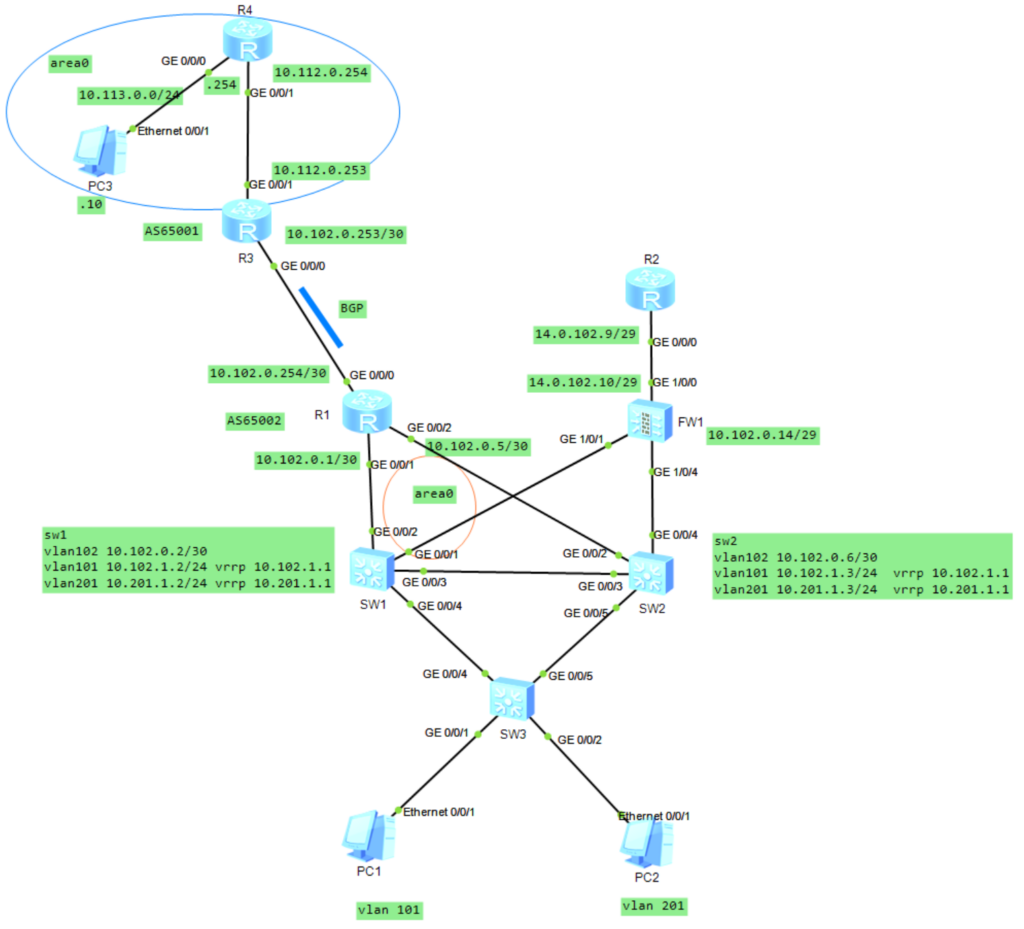
vlan 101 为企业内网用户、通过企业自建骨干网访问总部网络10.113.0.0/24 、不允许访问Internet ;

vlan 201 为IneterNet用户、不允许访问企业总部网络10.113.0.0/24 、允许访问InterNet.

实验拓扑

R4配置
interface GigabitEthernet0/0/0
 ip address 10.113.0.254 255.255.255.0 
#
interface GigabitEthernet0/0/1
 ip address 10.112.0.254 255.255.255.252 
#
interface LoopBack0
 ip address 10.100.254.252 255.255.255.255 
#
ospf 100 router-id 10.100.254.252 
 area 0.0.0.0 
  network 10.112.0.254 0.0.0.0 
  network 10.113.0.0 0.0.0.255 

R3配置
interface GigabitEthernet0/0/0
 description to-fenzhi
 ip address 10.102.0.253 255.255.255.252 
#
interface GigabitEthernet0/0/1
 ip address 10.112.0.253 255.255.255.252 
#
interface LoopBack0
 ip address 10.100.254.253 255.255.255.255 
#
bgp 65001
 router-id 10.100.254.253
 peer 10.102.0.254 as-number 65002 
 peer 10.102.0.254 connect-interface GigabitEthernet0/0/0
 #
 ipv4-family unicast
  undo synchronization
  import-route ospf 100
  peer 10.102.0.254 enable
#
ospf 100 router-id 10.100.254.253 
 import-route bgp
 area 0.0.0.0 
  network 10.112.0.253 0.0.0.0 

R1配置
interface GigabitEthernet0/0/0
 ip address 10.102.0.254 255.255.255.252 
#
interface GigabitEthernet0/0/1
 ip address 10.102.0.1 255.255.255.252 
#
interface GigabitEthernet0/0/2
 ip address 10.102.0.5 255.255.255.252 
#
interface LoopBack0
 ip address 10.102.0.101 255.255.255.255 
#
bgp 65002
 router-id 10.102.0.101
 peer 10.102.0.253 as-number 65001 
 peer 10.102.0.253 connect-interface GigabitEthernet0/0/0
 #
 ipv4-family unicast
  undo synchronization
  network 10.102.0.0 255.255.0.0 
  peer 10.102.0.253 enable
#
ospf 102 router-id 10.102.0.101 
 import-route bgp
 area 0.0.0.0 
  network 10.102.0.1 0.0.0.0 
  network 10.102.0.5 0.0.0.0 
  network 10.102.0.101 0.0.0.0 
#
ip route-static 10.102.0.0 255.255.0.0 NULL0 preference 255

SW1的配置
vlan batch 10 101 to 104 201 to 204
#
stp instance 1 priority 0
stp instance 2 priority 4096
#
stp region-configuration
 region-name name01
 instance 1 vlan 101 to 104
 instance 2 vlan 201 to 204
 active region-configuration
#
interface Vlanif10
 ip address 10.102.0.10 255.255.255.248
 vrrp vrid 10 virtual-ip 10.102.0.9
 vrrp vrid 10 priority 110
#
interface Vlanif101
 description neiwang
 ip address 10.102.1.2 255.255.255.0
 vrrp vrid 101 virtual-ip 10.102.1.1
 vrrp vrid 101 priority 120
#
interface Vlanif102
 description neiwang
 ip address 10.102.0.2 255.255.255.252
#
interface Vlanif201
 description to-waiwang
 ip address 10.201.1.2 255.255.255.0
 vrrp vrid 201 virtual-ip 10.201.1.1
 vrrp vrid 201 priority 110
#
interface GigabitEthernet0/0/1
 port link-type trunk
 port trunk allow-pass vlan 10
#
interface GigabitEthernet0/0/2
 description to-r1
 port link-type access
 port default vlan 102
#
interface GigabitEthernet0/0/3
 description to-sw2
 port link-type trunk
 port trunk allow-pass vlan 10 101 to 104 201 to 204
#
interface GigabitEthernet0/0/4
 description to-sw3
 port link-type trunk
 port trunk allow-pass vlan 101 to 104 201 to 204
#
interface LoopBack0
 ip address 10.102.0.102 255.255.255.255
#
ospf 100 router-id 10.102.0.102
 silent-interface all
 undo silent-interface GigabitEthernet0/0/2
 undo silent-interface Vlanif102
 area 0.0.0.0
  network 10.102.0.2 0.0.0.0
  network 10.102.1.0 0.0.0.255
#
ip route-static 0.0.0.0 0.0.0.0 10.102.0.14
SW2配置
vlan batch 10 101 to 104 201 to 204
#
stp instance 1 priority 4096
stp instance 2 priority 0
#
stp region-configuration
 region-name name01
 instance 1 vlan 101 to 104
 instance 2 vlan 201 to 204
 active region-configuration
#
interface Vlanif10
 ip address 10.102.0.11 255.255.255.248
 vrrp vrid 10 virtual-ip 10.102.0.9
 vrrp vrid 10 priority 120
#
interface Vlanif101
 ip address 10.102.1.3 255.255.255.0
 vrrp vrid 101 virtual-ip 10.102.1.1
#
interface Vlanif102
 ip address 10.102.0.6 255.255.255.252
#
interface Vlanif201
 description to-waiwang
 ip address 10.201.1.3 255.255.255.0
 vrrp vrid 201 virtual-ip 10.201.1.1
 vrrp vrid 201 priority 120
#
interface GigabitEthernet0/0/2
 description toR1
 port link-type access
 port default vlan 102
#
interface GigabitEthernet0/0/3
 description to-sw1
 port link-type trunk
 port trunk allow-pass vlan 10 101 to 104 201 to 204
#
interface GigabitEthernet0/0/4
 port link-type trunk
 port trunk allow-pass vlan 10
#
interface GigabitEthernet0/0/5
 description to-sw3
 port link-type trunk
 port trunk allow-pass vlan 101 to 104 201 to 204
#
interface LoopBack0
 ip address 10.102.0.103 255.255.255.255
#
ospf 100 router-id 10.102.0.103
 silent-interface all
 undo silent-interface Vlanif102
 undo silent-interface GigabitEthernet0/0/2
 area 0.0.0.0
  network 10.102.0.6 0.0.0.0
  network 10.102.1.0 0.0.0.255
#
ip route-static 0.0.0.0 0.0.0.0 10.102.0.14

sw3配置
vlan batch 101 201
#
interface GigabitEthernet0/0/1
 port link-type access
 port default vlan 101
#
interface GigabitEthernet0/0/2
 port link-type access
 port default vlan 201
#
interface GigabitEthernet0/0/4
 description to-sw1
 port link-type trunk
 port trunk allow-pass vlan 101 to 104 201 to 204
#
interface GigabitEthernet0/0/5
 description to-sw2
 port link-type trunk
 port trunk allow-pass vlan 101 to 104 201 to 204

fw1配置
vlan batch 10
#
interface Vlanif10
 ip address 10.102.0.14 255.255.255.248
 service-manage ping permit
#
interface GigabitEthernet1/0/0
 undo shutdown
 ip address 14.0.102.10 255.255.255.248
 service-manage ping permit
#
interface GigabitEthernet1/0/1
 portswitch
 description to-sw1
 undo shutdown
 port link-type trunk
 port trunk allow-pass vlan 10
#
interface GigabitEthernet1/0/4
 portswitch
 description to-sw2
 undo shutdown
 port link-type trunk
 port trunk allow-pass vlan 10
#
firewall zone trust
 set priority 85
 add interface GigabitEthernet0/0/0
 add interface GigabitEthernet1/0/1
 add interface GigabitEthernet1/0/4
 add interface Vlanif10
#
firewall zone untrust
 set priority 5
 add interface GigabitEthernet1/0/0
#
ip route-static 0.0.0.0 0.0.0.0 14.0.102.9
ip route-static 10.201.1.0 255.255.255.0 10.102.0.9
#
security-policy
 rule name permit-ping
  source-zone local
  service icmp
  action permit
 rule name permit-t-u
  source-zone trust
  destination-zone untrust
  source-address 10.201.1.0 mask 255.255.255.0
  action permit
#
nat-policy
 rule name nat01
  source-zone trust
  egress-interface GigabitEthernet1/0/0
  action source-nat easy-ip
R2配置
#
interface GigabitEthernet0/0/0
 ip address 14.0.102.9 255.255.255.0 

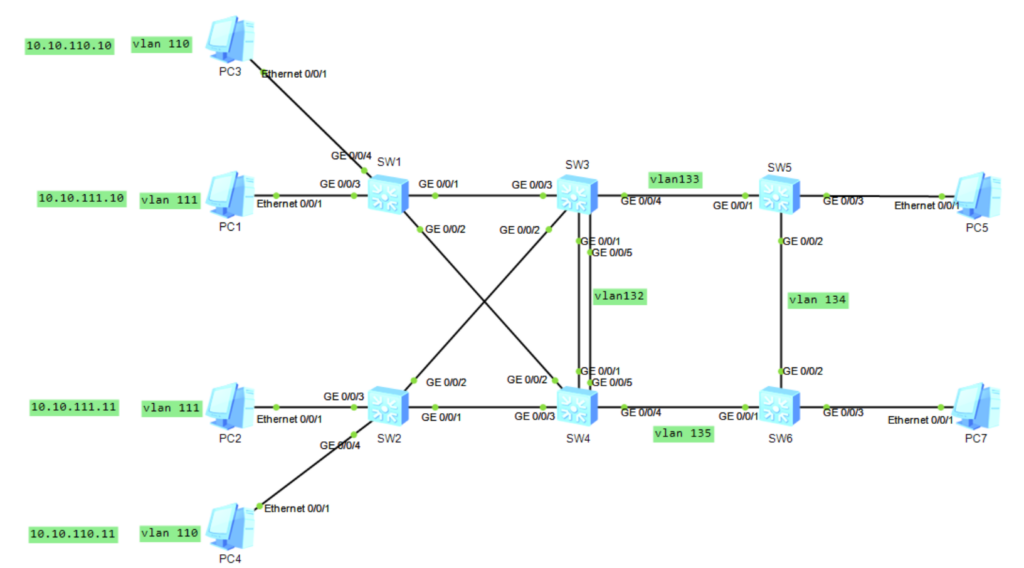
Network 实验1 mstp+vrrp+ospf 口字型实验

  • 1、规划 vlan 对应的mstp 实例、实例1关联vlan 111 实例2 关联110 、配置实例1 的根桥是sw3、实例2的根桥是sw4。
  • 2、设置vrrp的优先级
  • 3、pc5、pc7 划入vlan134
  • 4、规划ospf
业务地点业务vlansw3sw4默认网关
生产办公室vlan11010.10.110.210.10.110.310.10.110.1
质量中心vlan11110.10.111.210.10.111.310.10.111.1
设备管理地址vlan13210.10.132.210.10.132.310.10.132.1
本地设备本地端口对端设备对端端口VlanTrunk
sw3g0/0/1sw4g0/0/1v
g0/0/2sw2g0/0/2v
g0/0/3sw1g0/0/1v
g0/0/4sw5g0/0/1v
g0/0/5sw4g0/0/5v
sw4g0/0/1sw3g0/0/1v
g0/0/2sw1g0/0/2v
g0/0/3sw2g0/0/1v
g0/0/4sw6g0/0/1v
g0/0/5sw3g0/0/5v
sw5g0/0/2sw6g0/0/2v

交换机通用配置

telnet server enable
user-interface vty 0 4
protocol inbound telnet
authentication-mode password
set authentication password cipher admin@123
user privilege level 15

sw1、sw2配置

vlan batch 110 to 111 132
lldp enable
stp mode mstp
interface GigabitEthernet0/0/1
 port link-type trunk
 port trunk allow-pass vlan 110 to 111 132
 undo port trunk allow-pass vlan 1
 unicast-suppression 30
 multicast-suppression 30
 broadcast-suppression 30
 storm-control broadcast min-rate 5000 max-rate 8000
 storm-control action block
 storm-control enable trap
quit
interface GigabitEthernet0/0/2
 port link-type trunk
 port trunk allow-pass vlan 110 to 111 132
 undo port trunk allow-pass vlan 1
 unicast-suppression 30
 multicast-suppression 30
 broadcast-suppression 30
 storm-control broadcast min-rate 5000 max-rate 8000
 storm-control action block
 storm-control enable trap
quit
interface GigabitEthernet0/0/3
 port link-type access
 port default vlan 111
 stp edge-port enable 
quit
interface GigabitEthernet0/0/4
 port link-type access
 port default vlan 110
 stp edge-port enable   //不参与生成树计算,但转发bpdu报文
quit
port-group 1 
group-member g0/0/5 to g0/0/24 
stp edge-port enable 
quit
stp region-configuration
 region-name name01
 instance 1 vlan 111
 instance 2 vlan 110
 active region-configuration
quit
路由配置sw1
interface Vlanif132
 ip address 10.10.132.11 255.255.255.0
ip route-static  0.0.0.0 0.0.0.0  10.10.132.1
路由配置sw2
interface Vlanif132
 ip address 10.10.132.12 255.255.255.0
ip route-static  0.0.0.0 0.0.0.0  10.10.132.1

sw3 配置

vlan batch 110 to 111 130 to 133
lldp enable
stp mode mstp
interface Eth-Trunk1
 port link-type trunk
 port trunk allow-pass vlan 110 to 111 132
 load-balance src-dst-mac
 trunkport GigabitEthernet 0/0/1 
 trunkport GigabitEthernet 0/0/5
 quit
port-group 1 
group-member g0/0/2 to g0/0/3
port link-type trunk
port trunk allow-pass vlan 110 111 132
undo port trunk allow-pass vlan 1
quit
stp region-configuration
 region-name name01
 instance 1 vlan 111
 instance 2 vlan 110
 active region-configuration
stp instance 1 priority 0
stp instance 2 priority 4096
quit
interface Vlanif110
 ip address 10.10.110.2 255.255.255.0
 vrrp vrid 110 virtual-ip 10.10.110.1
 vrrp vrid 110 priority 100(缺省情况下,优先级的取值是100。数值越大,优先级越高。)
quit
interface Vlanif111
 ip address 10.10.111.2 255.255.255.0
 vrrp vrid 111 virtual-ip 10.10.111.1
 vrrp vrid 111 priority 120
quit
interface Vlanif132
 ip address 10.10.132.2 255.255.255.0
 vrrp vrid 132 virtual-ip 10.10.132.1
 vrrp vrid 132 priority 120
quit
interface Vlanif133
 ip address 10.10.133.3 255.255.255.0 
 ospf network-type p2p

interface GigabitEthernet0/0/4
 port link-type trunk
 port trunk allow-pass vlan 132 to 135
 stp disable
interface loopback0 
ip address 3.3.3.3 32
ospf 100 router-id 3.3.3.3 
 silent-interface Vlanif110
 silent-interface Vlanif111
 area 0.0.0.0 
  network 10.10.132.0 0.0.0.255 
  network 10.10.133.0 0.0.0.255 
  network 10.10.110.0 0.0.0.255 
  network 10.10.111.0 0.0.0.255 


sw4 配置
vlan batch 110 to 111 132 135
lldp enable
stp mode mstp

interface Eth-Trunk1
 port link-type trunk
 port trunk allow-pass vlan 110 to 111 132
 load-balance src-dst-mac
 trunkport GigabitEthernet 0/0/1 
 trunkport GigabitEthernet 0/0/5
 quit
port-group 1 
group-member g0/0/2 to g0/0/3
port link-type trunk
port trunk allow-pass vlan 110 111 132
undo port trunk allow-pass vlan 1
quit
stp region-configuration
 region-name name01
 instance 1 vlan 111
 instance 2 vlan 110
 active region-configuration
stp instance 1 priority 4096
stp instance 2 priority 0
quit
interface Vlanif110
 ip address 10.10.110.3 255.255.255.0
 vrrp vrid 110 virtual-ip 10.10.110.1
 vrrp vrid 110 priority 120
quit
interface Vlanif111
 ip address 10.10.111.3 255.255.255.0
 vrrp vrid 111 virtual-ip 10.10.111.1
 vrrp vrid 111 priority 100
quit
interface Vlanif132
 ip address 10.10.132.3 255.255.255.0
 vrrp vrid 132 virtual-ip 10.10.132.1
 vrrp vrid 132 priority 100
 quit
interface Vlanif135
 ip address 10.10.135.4 255.255.255.0 
 ospf network-type p2p
interface GigabitEthernet0/0/4
  stp disable
  port link-type trunk
  port trunk allow-pass vlan 132 to 135
interface LoopBack0
 ip address 4.4.4.4 255.255.255.255 
ospf 100 router-id 4.4.4.4 
 silent-interface Vlanif110
 silent-interface Vlanif111
 area 0.0.0.0 
  network 10.10.132.0 0.0.0.255 
  network 10.10.135.0 0.0.0.255 
  network 10.10.110.0 0.0.0.255 
  network 10.10.111.0 0.0.0.255 

sw5配置

sysname sw5
vlan batch 133 to 134
undo info-center enable
interface Vlanif133
 ip address 10.10.133.5 255.255.255.0 
 ospf network-type p2p
interface Vlanif134
 ip address 10.10.134.5 255.255.255.0 
 ospf network-type p2p
interface GigabitEthernet0/0/1
 port link-type trunk
 port trunk allow-pass vlan 132 to 135
 stp disable
interface GigabitEthernet0/0/2
 port link-type trunk
 port trunk allow-pass vlan 132 to 135
 stp disable
interface GigabitEthernet0/0/3
 port link-type access
 port default vlan 134
interface LoopBack0
 ip address 5.5.5.5 255.255.255.255 
ospf 100 router-id 5.5.5.5 
 area 0.0.0.0 
  network 10.10.133.0 0.0.0.255 
  network 10.10.134.0 0.0.0.255 

sysname sw6
undo info-center enable
vlan batch 134 to 135
interface Vlanif134
 ip address 10.10.134.6 255.255.255.0 
 ospf network-type p2p
interface Vlanif135
 ip address 10.10.135.6 255.255.255.0 
 ospf network-type p2p
interface GigabitEthernet0/0/1
 port link-type trunk
 port trunk allow-pass vlan 132 to 135
 stp disable
interface GigabitEthernet0/0/2
 port link-type trunk
 port trunk allow-pass vlan 132 to 135
 stp disable
interface GigabitEthernet0/0/3
 port link-type access
 port default vlan 134
interface LoopBack0
 ip address 6.6.6.6 255.255.255.255 
ospf 100 router-id 6.6.6.6 
 area 0.0.0.0 
  network 10.10.134.0 0.0.0.255 
  network 10.10.135.0 0.0.0.255 

修改ospf 路径选择

 ospf 1
nexthop 10.1.2.2 weight 1
quit